Markdown Editor
Write Markdown and see a live preview instantly.
Saved Documents
See Free Online Markdown Editor with Live Preview & Saved Documents in action
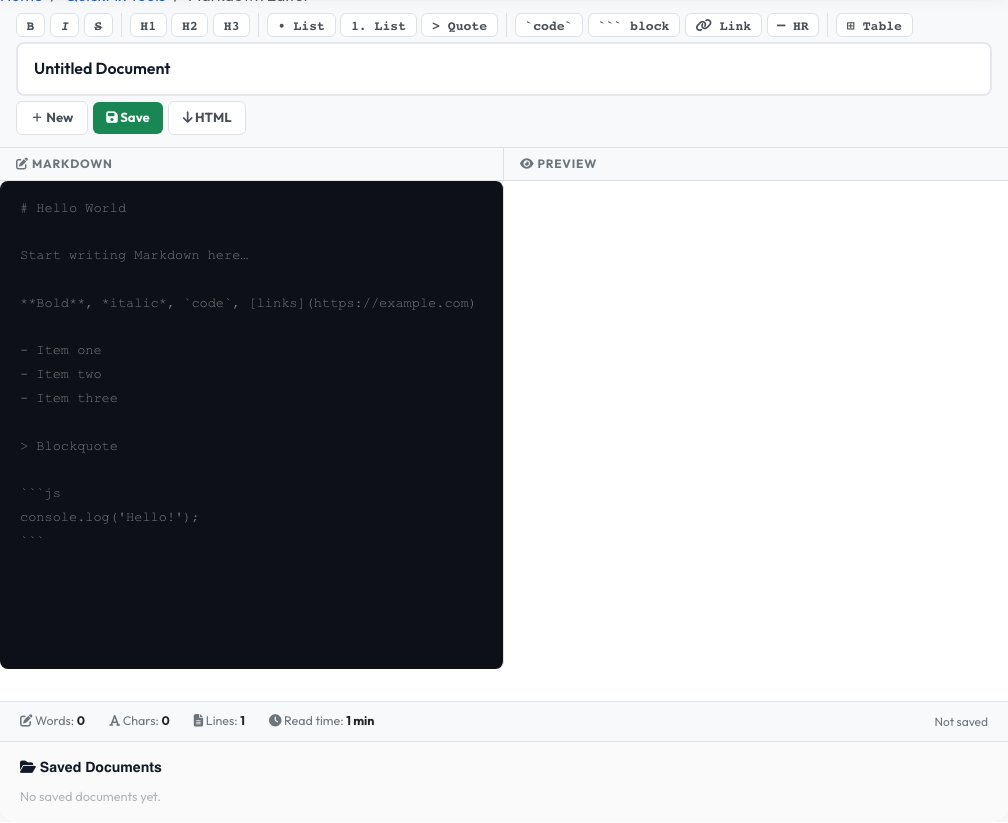
Free Online Markdown Editor with Live Preview & Saved Documents
Write Markdown in a split-pane editor and watch the rendered HTML preview update instantly on the other side — headings, bold/italic, links, images, blockquotes, ordered and unordered lists, fenced code blocks with syntax highlighting, and tables are all supported, with a toolbar for inserting formatting you don't want to type from memory.
Unlike a purely throwaway editor, this one lets you save, reopen and delete documents: signed-in users get a personal document list tied to their account, and anonymous visitors get a private, token-based document list that persists in their browser, so drafts survive a closed tab.
Key features
Live side-by-side preview
Rendered HTML updates as you type, with no delay and no server call for the preview itself.
Save, reopen & delete documents
Documents persist per account (signed in) or per browser token (anonymous), not just for the current session.
Formatting toolbar
Insert bold, links, lists, tables and code blocks with one click if you don't remember the syntax.
Export to HTML
Download the rendered output as a standalone HTML file when you're ready to publish elsewhere.
How to use it
- Type or paste Markdown into the left panel.
- Watch the rendered preview update live on the right.
- Save your document to come back to it later, or use the toolbar for quick formatting.
- Export or copy the rendered HTML when you're finished.
Worked example
Example
Input:  ## Hello\n**World** and a [link](https://example.com)
Renders as: an H2 heading "Hello", followed by bold "World" and a clickable link — visible instantly in the right-hand preview pane.
Who uses this tool
Developers
Draft a README or GitHub issue with a real-time preview before pasting it into a repository.
Bloggers & technical writers
Write in Markdown for a static site generator and see the rendered result before publishing, with drafts saved between visits.
Students & note-takers
Keep a running list of saved notes formatted with headings, lists and tables without a heavyweight app.
Tips for the best results
- Use fenced code blocks (triple backticks) with a language name for syntax highlighting in the preview.
- Leave a blank line between a paragraph and a following list or heading — most Markdown renderers require it to render correctly.
- Save your document as you write rather than only at the end, so nothing is lost if you close the tab.
- Preview on your target platform (GitHub, a blog CMS) before publishing, since exact table and footnote support can vary slightly between renderers.
Common mistakes to avoid
- Assuming your draft is private and untracked because it's "just a browser tool" — signed-out users get a token-based saved list too, so don't paste anything sensitive you don't want saved.
- Forgetting the blank line before a list, which merges it into the preceding paragraph instead of rendering as a list.
- Writing raw HTML expecting it not to render — most Markdown renderers pass embedded HTML straight through.
Why use AZRS QuickFix?
It is 100% free, needs no signup and has no watermark or usage limits. The tool runs in your browser, so what you type stays on your device, and it works on phones, tablets and desktops. New tools are added every week — bookmark this page or browse the full QuickFix toolbox.
Frequently asked questions
Is this Markdown editor free?
Yes, 100% free with no sign-up required to use the editor and preview.
Can I save my document and come back later?
Yes. Signed-in users get documents tied to their account; anonymous visitors get a private, browser-based document list.
Can I export my Markdown to HTML?
Yes, use the export option to download clean HTML you can paste into any website, blog or CMS.
Is this GitHub-flavored Markdown?
Yes, it supports common GitHub-flavored extensions including tables and fenced code blocks.
What is Markdown used for?
A lightweight plain-text format for READMEs, documentation, blog posts, notes and forum comments, using simple characters instead of a heavyweight word processor.
Do I need an account to save documents?
No, anonymous documents are saved using a private browser token — though creating an account keeps them tied to you across devices.