PID Controller Tuning Lab
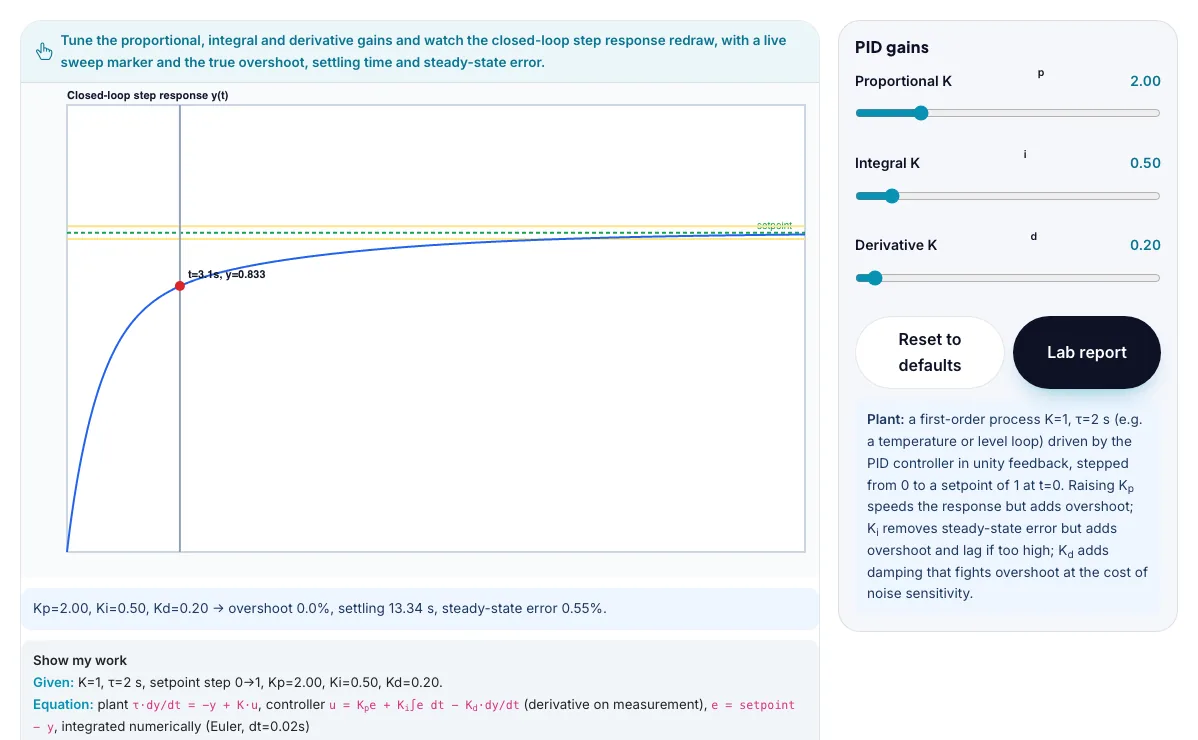
Tune proportional, integral and derivative gains on a real first-order plant, watch the closed-loop step response redraw with a sweeping time marker, and read off the true overshoot, settling time and steady-state error.
Tune the proportional, integral and derivative gains and watch the closed-loop step response redraw, with a live sweep marker and the true overshoot, settling time and steady-state error.
τ·dy/dt = -y + K·u, controller u = Kpe + Ki∫e dt - Kd·dy/dt (derivative on measurement), e = setpoint - y, integrated numerically (Euler, dt=0.02s)What the PID Controller Tuning Lab shows
Tune proportional, integral and derivative gains on a real first-order plant, watch the closed-loop step response redraw with a sweeping time marker. Built for engineering, the pid controller tuning lab runs instantly in your browser: change a setting or drag an object and the result updates at once, so you learn by trying things out rather than only reading about them.
A closed-loop PID lab with step-response plots. Tune Kp, Ki and Kd and read rise time, overshoot and settling.
How to use the PID Controller Tuning Lab
In the PID Controller Tuning Lab, use the controls to change Proportional Kp, Integral Ki, Derivative Kd. The simulation reacts instantly.
Start with this experiment: Try the well-damped challenge: overshoot below 10%, settling time below 10 s. Drag any glowing handle, object or slider with your mouse or finger and the PID Controller Tuning Lab responds in real time.
Change one setting at a time and watch which readout moves, then compare it with this idea: A PID controller drives a plant using u = Kp·e + Ki·∫e dt + Kd·de/dt, where e is the error between setpoint and measured output.
Things to try
Try the well-damped challenge: overshoot below 10%, settling time below 10 s.
Try the integral-action challenge: steady-state error below 1% while keeping overshoot below 25%.
Push Kp very high alone and watch the oscillation grow.
Add derivative gain to tame an overshoot without giving up speed.
The science behind it
A PID controller drives a plant using u = Kp·e + Ki·∫e dt + Kd·de/dt, where e is the error between setpoint and measured output.
Raising Kp alone speeds up the response and shrinks steady-state error, but too much Kp causes overshoot and eventually oscillation.
Integral action (Ki) is the only term that can drive steady-state error to exactly zero, because it keeps accumulating as long as any error remains - but too much Ki adds overshoot and lag ('integral windup').
Derivative action (Kd) reacts to the rate of change of error, adding damping that can reduce overshoot from aggressive Kp or Ki - but too much Kd amplifies any noise in the measurement.
A worked example with real numbers
e = 0.3
P = 3 × 0.3 = 0.90
I = 1.2 × 0.4 = 0.48
D = 0.5 × (−0.2) = −0.10
u = 0.90 + 0.48 − 0.10 = 1.28
Tips and common mistakes
Tips
- Change one gain at a time and note rise time, overshoot and settling.
- Aim for under about 10% overshoot with a quick settle.
- Use the Lab Report to compare tunings.
Common mistakes
- Raising all gains together makes the loop unstable.
- Integral action cures steady error but slows the response.
- Derivative cannot fix a badly tuned P and I.
Where this is used
Control engineers tune exactly these three gains on real temperature loops, flow loops, motor speed controllers, drone stabilization and robotic arm position control, balancing response speed against overshoot and steady-state accuracy.
Who is this simulation for?
Engineering and technology students, makers, robotics clubs and teachers of design and technology. A good first experiment in the PID Controller Tuning Lab: Try the well-damped challenge: overshoot below 10%, settling time below 10 s. The key relation to keep an eye on: u = Kp e + Ki ∫e dt + Kd de/dt; closed loop settles when e → 0.
For teachers: project the PID Controller Tuning Lab on the board, let students predict the result, then run it together and test this: Try the integral-action challenge: steady-state error below 1% while keeping overshoot below 25%. For students: change one thing at a time and write down what changes.
Frequently asked questions
Why does proportional control alone almost always leave a steady-state error on this kind of plant?
With pure proportional control, the controller output is u=Kp·e, and at steady state y settles wherever e becomes just small enough that Kp·e·K exactly balances the plant's natural decay - since e can never reach exactly zero without a control action to sustain it, a permanent offset (steady-state error) remains unless integral action is added to keep pushing once error is small.
Why can adding too much integral gain actually make the response worse instead of better?
Integral action keeps accumulating even while the output is overshooting toward the setpoint, so by the time the output arrives at the setpoint the accumulated integral term is still pushing it further, causing it to overshoot and then have to unwind that same accumulated term before it can settle - producing larger overshoot and a longer, more oscillatory settling process.
Is the PID Controller Tuning Lab free to use?
Yes. The PID Controller Tuning Lab is free, needs no signup or download and runs in your web browser. It is part of the Engineering group of AZRS simulations.
Does the PID Controller Tuning Lab work on a phone or tablet?
Yes. The PID Controller Tuning Lab takes touch input as well as mouse input, so you can use its 3 adjustable settings with a finger. A larger screen makes the controls and graphs easier to read.