Respiratory System & Lung Ventilation Simulator
Change breathing rate, tidal volume, airway resistance and lung compliance, and watch the lungs and alveoli move air and exchange gas in real time.
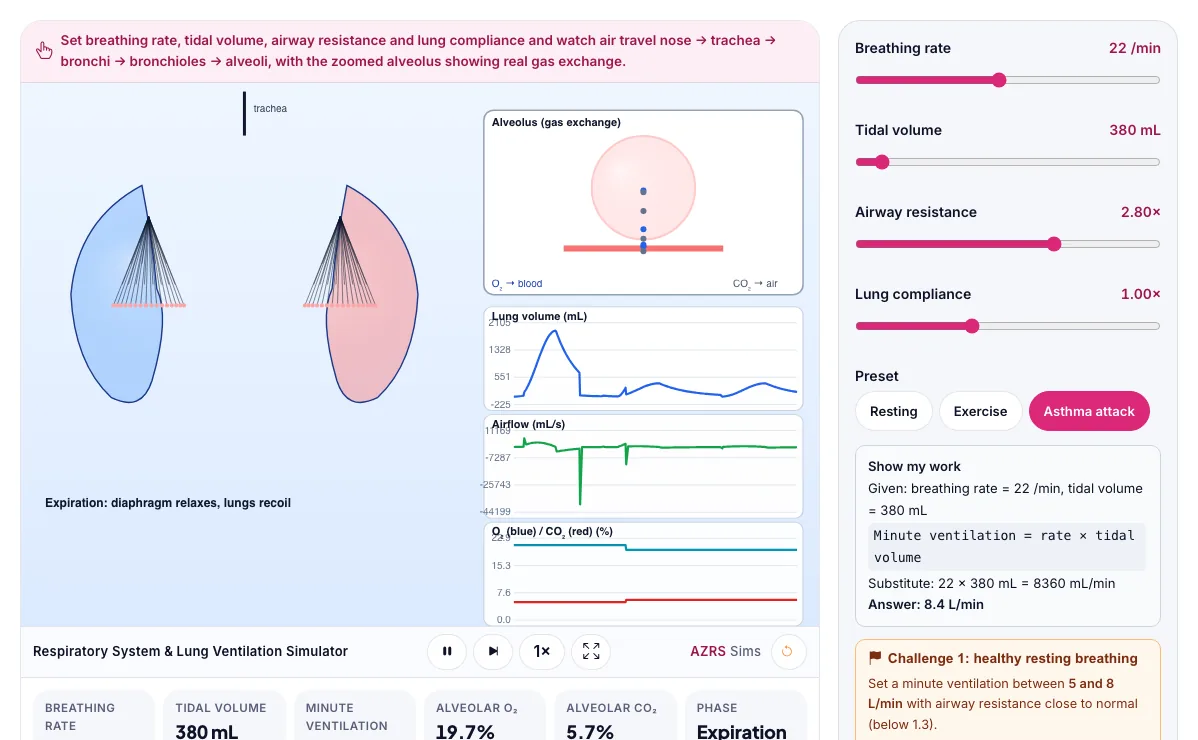
Set breathing rate, tidal volume, airway resistance and lung compliance and watch air travel nose → trachea → bronchi → bronchioles → alveoli, with the zoomed alveolus showing real gas exchange.
What the Respiratory System & Lung Ventilation Simulator shows
Change breathing rate, tidal volume, airway resistance and lung compliance, and watch the lungs and alveoli move air and exchange gas in real time. Built for biology, the respiratory system & lung ventilation simulator runs instantly in your browser: change a setting or drag an object and the result updates at once, so you learn by trying things out rather than only reading about them.
Change breathing rate, tidal volume, resistance and compliance and watch lungs and alveoli move.
How to use the Respiratory System & Lung Ventilation Simulator
In the Respiratory System & Lung Ventilation Simulator, use the controls to change Breathing rate, Tidal volume, Airway resistance, Lung compliance, Preset. The simulation reacts instantly.
In the Respiratory System & Lung Ventilation Simulator, pick an option such as Resting, Exercise, Asthma attack to switch modes or load an example.
In the Respiratory System & Lung Ventilation Simulator, press "Check my breathing", "Check compensation" to start, reset or change what is happening.
Start with this experiment: Load the Exercise preset and watch minute ventilation rise. Drag any glowing handle, object or slider with your mouse or finger and the Respiratory System & Lung Ventilation Simulator responds in real time.
Change one setting at a time and watch which readout moves, then compare it with this idea: Minute ventilation = breathing rate × tidal volume.
Things to try
Load the Exercise preset and watch minute ventilation rise.
Load the Asthma attack preset and compare the lung-volume trace shape to resting breathing.
Raise airway resistance alone and see the volume graph change shape even with the same tidal volume.
Try the challenge: reach a healthy resting minute ventilation between 5 and 8 L/min.
The science behind it
Minute ventilation = breathing rate × tidal volume.
Airway resistance slows the exhale most, stretching the recovery back to resting volume.
Alveoli exchange oxygen for carbon dioxide by diffusion, driven by the pressure difference across a thin membrane.
Higher minute ventilation raises alveolar oxygen and lowers alveolar carbon dioxide.
A worked example with real numbers
Minute ventilation = 6.0 L/min
Alveolar ventilation = (500 - 150) x 12 = 4.2 L/min
Tips and common mistakes
Tips
- Try shallow fast breathing and compare alveolar ventilation.
- Raise resistance to model asthma.
Common mistakes
- Counting dead space as gas exchange.
- Thinking exhaling is always active.
Where this is used
Doctors read spirometry traces exactly like this one to diagnose asthma, COPD and other breathing conditions, and to track how well treatment is working.
Who is this simulation for?
Biology students and teachers who want to explore living systems, populations and genetics interactively and safely. A good first experiment in the Respiratory System & Lung Ventilation Simulator: Load the Exercise preset and watch minute ventilation rise. The key relation to keep an eye on: minute ventilation = tidal volume x rate; alveolar ventilation = (V_T - dead space) x rate; compliance = delta V / delta P.
For teachers: project the Respiratory System & Lung Ventilation Simulator on the board, let students predict the result, then run it together and test this: Load the Asthma attack preset and compare the lung-volume trace shape to resting breathing. For students: change one thing at a time and write down what changes.
Frequently asked questions
What is tidal volume?
The volume of air moved in or out of the lungs in one normal, quiet breath.
Why does an asthma attack make breathing feel harder?
Narrowed airways raise resistance, which slows airflow (especially breathing out) and can trap air in the lungs.
Is the Respiratory System & Lung Ventilation Simulator free to use?
Yes. The Respiratory System & Lung Ventilation Simulator is free, needs no signup or download and runs in your web browser. It is part of the Biology group of AZRS simulations.
Does the Respiratory System & Lung Ventilation Simulator work on a phone or tablet?
Yes. The Respiratory System & Lung Ventilation Simulator takes touch input as well as mouse input, so you can use its 5 adjustable settings with a finger. A larger screen makes the controls and graphs easier to read.