Free Hash Generator
MD5 · SHA-1 · SHA-256 · SHA-512 · SHA3 · BLAKE2 — hash text or files instantly.
Drag & Drop any file here
or click to browse — all file types supported
HMAC combines a secret key with the message to produce an authenticated hash. Only the selected algorithms will be used.
Enter text or upload a file, select algorithms, then click Generate Hashes.
Compare / Verify Hash
Paste a known hash here to verify it against any of your generated results above.
Algorithm Reference
| Algorithm | Output Size | Speed | Security | Common Use |
|---|---|---|---|---|
| MD5 | 128-bit / 32 hex | Very fast | Broken | Checksums, legacy systems |
| SHA-1 | 160-bit / 40 hex | Fast | Broken | Git commits, legacy TLS |
| SHA-224 | 224-bit / 56 hex | Fast | Secure | Constrained environments |
| SHA-256 | 256-bit / 64 hex | Fast | Secure | TLS, code signing, Bitcoin |
| SHA-384 | 384-bit / 96 hex | Moderate | Secure | TLS certificates |
| SHA-512 | 512-bit / 128 hex | Moderate | Secure | Password hashing, archives |
| SHA3-256 | 256-bit / 64 hex | Moderate | Secure | Modern applications |
| SHA3-512 | 512-bit / 128 hex | Slower | Secure | High-security applications |
| BLAKE2b | 512-bit / 128 hex | Very fast | Secure | File integrity, password hashing |
| BLAKE2s | 256-bit / 64 hex | Very fast | Secure | Embedded / 32-bit systems |
See Free Hash Generator — MD5, SHA-256, SHA-512 & More in action
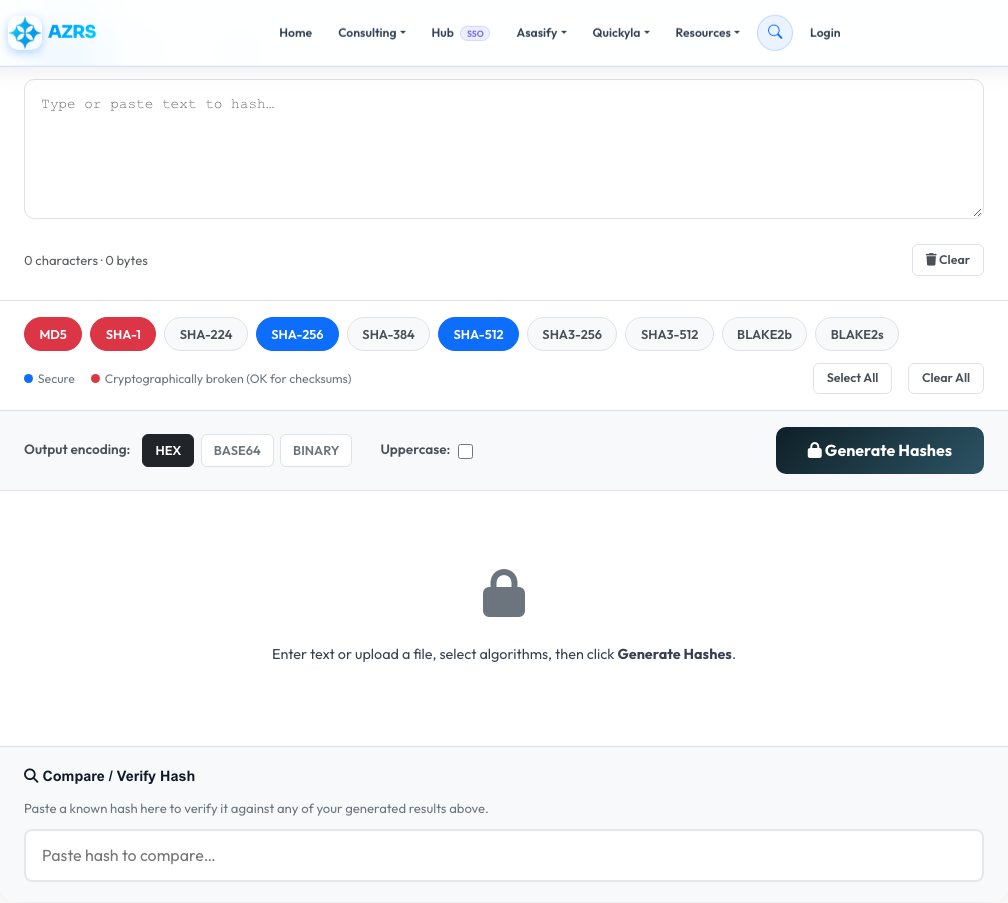
Free Hash Generator — MD5, SHA-256, SHA-512 & More
Generate cryptographic hashes for text or files using MD5, SHA-1, SHA-224, SHA-256, SHA-384, SHA-512, SHA3-256, SHA3-512, BLAKE2b and BLAKE2s. Type text directly or upload a file up to 100 MB, and get every selected algorithm's hash instantly, output as hex, Base64 or binary.
It also supports HMAC mode (a keyed hash using a secret key for authentication, not just integrity), and a compare/verify box where you paste a known hash to instantly check whether it matches — useful for confirming a downloaded file hasn't been tampered with.
Key features
10 hash algorithms
MD5, SHA-1/224/256/384/512, SHA3-256/512, and BLAKE2b/BLAKE2s, all computed in one pass.
Text and file hashing
Hash typed text or the raw binary content of an uploaded file up to 100 MB.
HMAC support
Generate keyed-hash message authentication codes using a secret key.
Hash verification
Paste a known hash to instantly check whether it matches your input.
How to use it
- Choose Text or File mode, and enter your text or upload a file.
- Select which hash algorithms you want computed.
- Pick an output encoding — HEX, Base64 or binary — and case.
- Copy the result, or paste a known hash into Compare/Verify to check a match.
Worked example
Example
Input text: "hello"
MD5: 5d41402abc4b2a76b9719d911017c592
SHA-256: 2cf24dba5fb0a30e26e83b2ac5b9e29e1b161e5c1fa7425e73043362938b9824
Who uses this tool
Developers
Verify data integrity or generate deterministic identifiers for content during development.
IT & security-conscious users
Confirm a downloaded file matches the hash published by the original source.
Students learning cryptography
Compare how different algorithms and inputs produce completely different fixed-length fingerprints.
Tips for the best results
- Use SHA-256, SHA-512, SHA3-256 or BLAKE2b for anything security-relevant — MD5 and SHA-1 are broken for that purpose.
- To verify file integrity, hash the file yourself and compare it against the hash the publisher provides, not a hash you generate elsewhere.
- Use HMAC mode when you need to prove a message came from someone who knows a shared secret, not just that the content is unchanged.
- For very large files, hashing may take a moment since it's processed in memory — this is normal.
Common mistakes to avoid
- Using MD5 or SHA-1 for password storage or any security-critical purpose — both are considered cryptographically broken.
- Comparing hashes from two different algorithms and expecting them to match — always compare the same algorithm's output.
- Forgetting that hashing is one-way — you cannot recover the original text or file from a hash.
Why use AZRS QuickFix?
It is 100% free, needs no signup and has no watermark or usage limits. The tool runs in your browser, so what you type stays on your device, and it works on phones, tablets and desktops. New tools are added every week — bookmark this page or browse the full QuickFix toolbox.
Frequently asked questions
What is a cryptographic hash?
A fixed-length fingerprint of any input data. The same input always gives the same hash, and even a single changed character produces a completely different result — hashes are one-way and cannot be reversed.
Which algorithm should I use?
For modern security use SHA-256, SHA-512, SHA3-256 or BLAKE2b. MD5 and SHA-1 have known vulnerabilities and should only be used for non-security checksums.
Can I hash a file?
Yes, upload any file up to 100 MB and the tool hashes its raw binary content, not just the filename.
What is HMAC and when should I use it?
HMAC combines a secret key with a hash algorithm to verify both integrity and authenticity — use it to confirm a message came from someone who knows the shared secret.
Do you store my input data?
No, everything is processed in memory and immediately discarded — nothing is logged or stored.
What's the difference between MD5 and SHA-256?
MD5 produces a 128-bit hash and is no longer cryptographically secure; SHA-256 produces a 256-bit hash and remains the standard for security-critical use.