AI Text Paraphraser
Rephrase, rewrite, and humanize any text in 10 professional writing styles. Instant results, unlimited use, 100% free.
AI Paraphraser
Rewrite text in 10 stylesStyle Guide
| Style | Best For |
|---|---|
| Standard | General content |
| Formal | Emails, reports |
| Casual | Social media, chats |
| Creative | Fiction, blogs |
| Academic | Papers, essays |
| Simple | Kids, ESL, readability |
| Persuasive | Ads, pitches, CTAs |
| SEO | Blog posts, landing pages |
| Storytelling | Narratives, case studies |
| Technical | Docs, specs, manuals |
Pro Tips
See Free AI Paraphrasing Tool — 10 Writing Styles in action
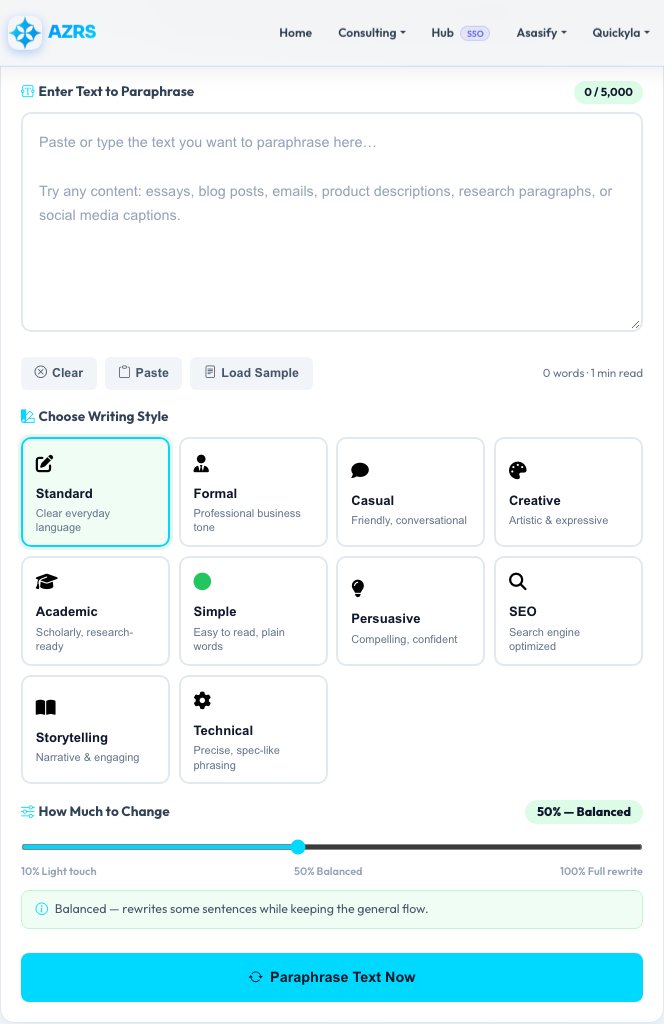
Free AI Paraphrasing Tool — 10 Writing Styles
This paraphraser uses AI to rewrite your text while preserving its meaning, in one of 10 styles — Standard, Formal, Casual, Creative, Academic, Simple, Persuasive, SEO, Storytelling or Technical — with an intensity slider that controls how heavily the wording and sentence structure change, from a light touch up to a full rewrite.
After rewriting, it shows a side-by-side comparison of the original and paraphrased text, a similarity score (the percentage of words that actually changed), and lists of words that were added versus removed, so you can see exactly how much the rewrite shifted from the source.
Key features
10 writing styles
From Academic and Technical to Casual and Storytelling — pick the tone that fits your audience.
Intensity control
A slider from light word-swaps to a full sentence-by-sentence rewrite.
Similarity score & word diff
See the percentage of changed words plus exactly which words were added or removed.
Original vs paraphrased view
A side-by-side panel makes it easy to compare the two versions at a glance.
How to use it
- Paste up to 5,000 characters of text into the input box.
- Choose one of the 10 writing styles that fits your context.
- Adjust the intensity slider for a light touch or a heavier rewrite.
- Click Paraphrase, then compare, copy or download the result.
Worked example
Example
Input: "The quick brown fox jumps over the lazy dog near the riverbank every single morning."
Standard-style output: "Every morning, a quick brown fox leaps over a lazy dog near the riverbank."
Who uses this tool
Students
Rewrite research notes in their own words for essays while keeping the original meaning intact.
Content writers
Repurpose one article into multiple pieces with different tones for different channels.
Non-native English speakers
Use the Simple style to rephrase complex sentences into clearer, easier-to-read language.
Tips for the best results
- Use a higher intensity when you need substantially different phrasing, not just a synonym swap.
- The SEO style balances natural keyword flow with active-voice readability — good for web copy.
- Always read the paraphrased result before publishing; AI rewrites can occasionally shift emphasis or nuance.
- For academic paraphrasing, still cite the original source — this tool changes wording, not attribution requirements.
Common mistakes to avoid
- Submitting paraphrased text as entirely original work without understanding your institution's policy on AI-assisted writing.
- Choosing a high intensity for technical or legal text, where precise wording matters more than variety.
- Ignoring the similarity score — a very high score means the rewrite barely changed anything, which may not meet your goal.
Why use AZRS QuickFix?
It is 100% free, needs no signup and has no watermark or usage limits. The tool runs in your browser, so what you type stays on your device, and it works on phones, tablets and desktops. New tools are added every week — bookmark this page or browse the full QuickFix toolbox.
Frequently asked questions
Is this AI paraphraser free?
Yes, 100% free with unlimited use — no signup and no credit card required.
What writing styles are available?
Standard, Formal, Casual, Creative, Academic, Simple, Persuasive, SEO, Storytelling and Technical.
What does the similarity score mean?
It shows what percentage of words differ between the original and paraphrased text — lower similarity means more rewriting was done.
Is there a character limit?
Yes, up to 5,000 characters per submission; split longer content into sections.
Is my text stored?
Only in your private history if you're logged in — never shared or sold.
Can I download the result?
Yes, click Download after paraphrasing to save the output as a .txt file.