Keyword Research Tool
Find Profitable Keywords with Real Data
Why Use Our Keyword Research Tool?
Discover the keywords your audience is actually searching for
Real Search Data
Get keyword suggestions from Google autocomplete - real queries people are typing right now. No guesswork.
Search Volume
Estimate monthly search volume for each keyword to prioritize high-traffic opportunities.
Keyword Difficulty
Understand competition levels and find easy-to-rank keywords perfect for your content strategy.
CPC Data
See cost-per-click estimates to identify valuable commercial keywords for paid and organic strategies.
Long-Tail Keywords
Discover specific, lower-competition phrases that convert better and are easier to rank for.
Unlimited Searches
No limits, no signup required. Research as many keywords as you need, completely free forever.
How to Use This Tool Effectively
Actionable SEO advice to get the most out of every analysis
Start With Your Competitors
Run your top 3 competitors through this tool first. Understanding their structure, keywords, and technical issues reveals exactly where you can outrank them.
Run Monthly Audits
SEO is not a one-time task. Schedule monthly checks to catch new issues before Google penalizes them. Consistent analysis beats one big yearly audit every time.
Fix High-Impact Issues First
Not all errors are equal. Prioritize: broken crawl paths → missing meta titles → slow load times → thin content. This order maximizes ranking gains per hour spent.
Internal Links Are Free PageRank
Every internal link passes authority between your pages. Use the Internal Link Finder to ensure your most important pages receive the most internal links.
Page Speed Directly Affects Rankings
Google's Core Web Vitals are a confirmed ranking factor. Pages loading under 2.5 seconds see significantly higher rankings and 40% lower bounce rates than slow pages.
Keep Your Sitemap Clean
Your sitemap tells Google what to index. Remove redirect chains, 404s, and noindex pages from it. A clean sitemap = faster, more complete indexation of good content.
More Free SEO Tools
Everything you need to dominate search rankings — all free, no signup required
🔍 SEO & Website Analysis
🧮 Free Calculators
⚙️ Developer & Utility Tools
See Free Keyword Research Tool in action
Free Keyword Research Tool
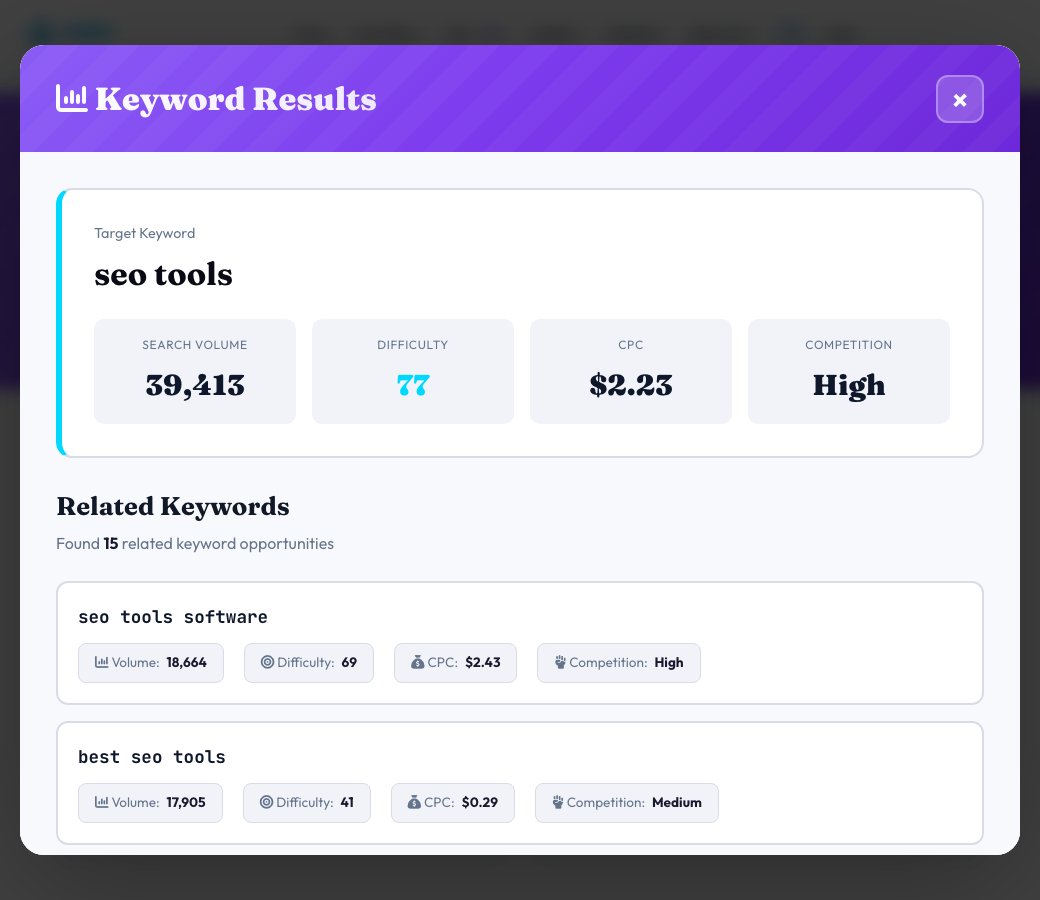
Enter a seed keyword and this tool pulls real, live keyword ideas from Google and Bing's own autocomplete suggestion APIs — the same predictive text you see typing into a search box — then pairs each one with illustrative search volume, difficulty and CPC estimates so you can quickly judge which variations are worth targeting first.
This is built to answer the practical question 'what are people actually typing around this topic', using live autocomplete data for the keyword ideas themselves. The volume/difficulty/CPC figures are directional estimates meant to help you prioritize and compare keywords relative to each other, not numbers pulled from Google Keyword Planner or a paid rank-tracking data feed — that's stated plainly so you know exactly what you're looking at.
Key features
Live autocomplete-sourced ideas
Keyword variations come from real Google and Bing autocomplete data when reachable, not just templated prefixes/suffixes.
15-20 related keywords per search
Each seed keyword expands into a full list of long-tail and modifier variations in one request.
Volume, difficulty & CPC estimates
Every keyword gets a directional estimate for the three numbers that matter most for prioritization.
Color-coded competition
Low/Medium/High competition labels make it fast to scan for easier opportunities.
How to use it
- Enter a seed keyword or topic.
- Choose your target country and language.
- Run the search to pull live autocomplete-based keyword ideas.
- Sort by volume or difficulty to find the best easier-to-rank opportunities first.
Worked example
Example
Searching 'seo tools' returns variations like 'free seo tools', 'seo tools for beginners' and 'best seo tools 2026', each with its own estimated volume, difficulty and CPC so you can spot the lower-competition options quickly.
Who uses this tool
Content writers and bloggers
Find long-tail variations of a topic worth writing dedicated pages for.
Small business owners doing their own SEO
Get real keyword ideas without paying for an enterprise keyword tool.
Marketers scoping a new campaign
Quickly compare estimated competition across related terms before committing budget.
Tips for the best results
- Use the longer, more specific variations when starting a new site — they're usually easier to rank for.
- Treat the volume/difficulty/CPC numbers as a relative comparison between keywords in the same list, not as an exact market figure.
- Combine a few related keywords into one comprehensive page instead of writing separate thin pages for each near-duplicate variation.
- Re-run periodically — autocomplete suggestions shift as search trends change.
Common mistakes to avoid
- Treating the estimated volume and CPC as exact numbers from Google Ads — they're directional estimates for prioritization, not guaranteed figures.
- Chasing only the highest-volume keyword and ignoring lower-volume, lower-competition variations that convert just as well.
- Stuffing the exact keyword phrase everywhere instead of writing naturally around the topic.
Why use AZRS QuickFix?
It is 100% free, needs no signup and has no watermark or usage limits. The tool runs in your browser, so what you type stays on your device, and it works on phones, tablets and desktops. New tools are added every week — bookmark this page or browse the full QuickFix toolbox.
Frequently asked questions
Where do the keyword ideas come from?
Live Google and Bing autocomplete suggestions for your seed keyword when those services are reachable, with a generated-variation fallback if they aren't.
Are the search volume, difficulty and CPC numbers real Google Ads data?
No — they're illustrative estimates designed to help you compare and prioritize keywords relative to each other, not figures pulled from Google Keyword Planner or a paid data provider. Treat them as directional, not exact.
How many keywords does one search return?
Up to 15-20 related keyword variations per seed keyword.
What does the competition label mean?
A Low/Medium/High rating based on the estimated difficulty score, giving a fast visual read on how contested a keyword looks.
Can I use this for any country or language?
Yes, choose your target country and language before searching to steer the autocomplete results.
Is this free?
Yes, free with no signup or usage limit.