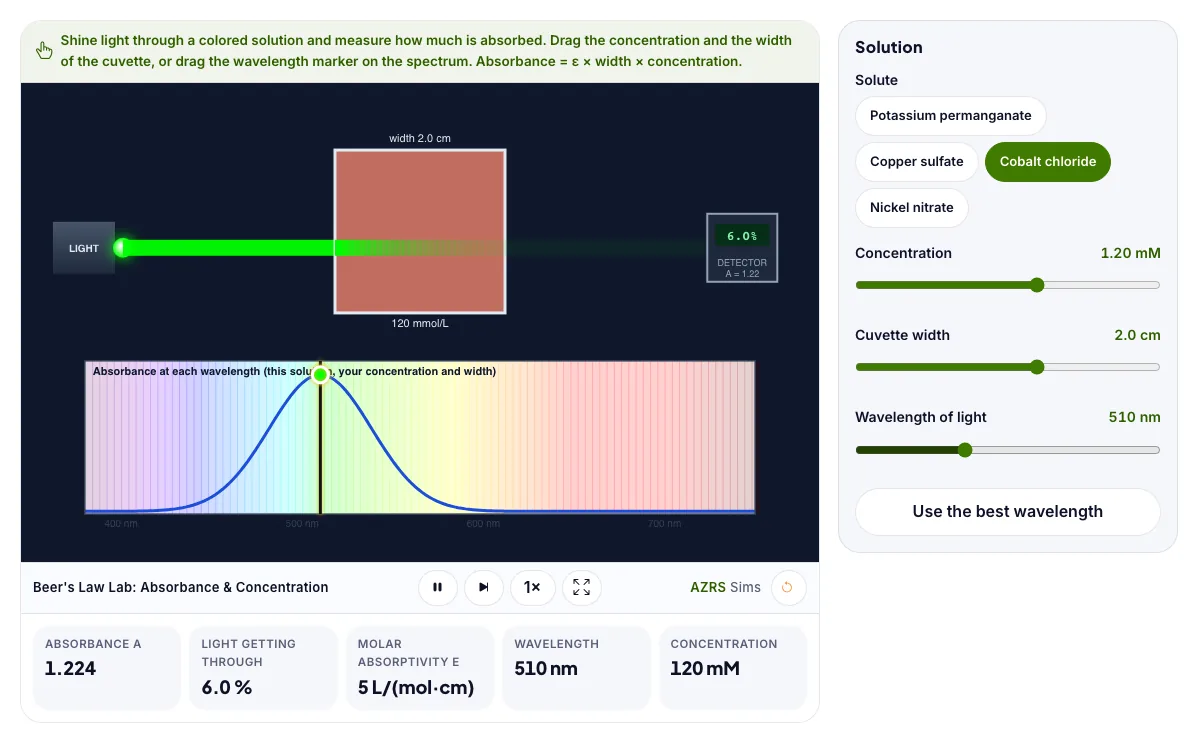
Beer's Law Lab: Absorbance & Concentration
Shine light through a colored solution and see how absorbance depends on concentration, width and wavelength.
Shine light through a colored solution and measure how much is absorbed. Drag the concentration and the width of the cuvette, or drag the wavelength marker on the spectrum. Absorbance = ε × width × concentration.
What the Beer's Law Lab: Absorbance & Concentration shows
Shine light through a colored solution and see how absorbance depends on concentration, width and wavelength. Free, no signup, runs in your browser. Built for chemistry labs, the beer's law lab: absorbance & concentration runs instantly in your browser: change a setting or drag an object and the result updates at once, so you learn by trying things out rather than only reading about them.
Light passes through a coloured solution. The more concentrated or thicker, the more light is absorbed.
How to use the Beer's Law Lab: Absorbance & Concentration
In the Beer's Law Lab: Absorbance & Concentration, use the controls to change Solute, Concentration, Cuvette width, Wavelength of light. The simulation reacts instantly.
In the Beer's Law Lab: Absorbance & Concentration, pick an option such as Potassium permanganate, Copper sulfate, Cobalt chloride, Nickel nitrate to switch modes or load an example.
In the Beer's Law Lab: Absorbance & Concentration, press "Use the best wavelength" to start, reset or change what is happening.
Start with this experiment: Find the wavelength with the highest absorbance for each solute. Drag any glowing handle, object or slider with your mouse or finger and the Beer's Law Lab: Absorbance & Concentration responds in real time.
Change one setting at a time and watch which readout moves, then compare it with this idea: Absorbance A = ε × width × concentration.
Things to try
Find the wavelength with the highest absorbance for each solute.
Double the concentration and check the absorbance doubles.
Make the cuvette three times wider and compare.
Read off the concentration that gives 50 percent transmittance.
The science behind it
Absorbance A = ε × width × concentration.
Doubling the concentration or the width doubles the absorbance.
Transmittance T = 10 to the power of minus A, so the light dims exponentially.
A solution absorbs the wavelengths that are the opposite color to what you see.
A worked example with real numbers
A = 5000 x 1.0 x 0.00010 = 0.50
Transmittance = 10^-0.5 = 31.6 %
Tips and common mistakes
Tips
- Double the width and absorbance doubles.
- Choose a wavelength the sample absorbs.
Common mistakes
- Confusing absorbance with transmittance.
- Using the law at very high concentrations.
Where this is used
Hospitals measure hemoglobin and glucose, water labs test pollutants, and chemists find unknown concentrations with spectrophotometers using this law.
Who is this simulation for?
Students preparing for practical exams and teachers who want a virtual lab. A good first experiment in the Beer's Law Lab: Absorbance & Concentration: Find the wavelength with the highest absorbance for each solute. The key relation to keep an eye on: A = epsilon l c = -log10(I / I0).
For teachers: project the Beer's Law Lab: Absorbance & Concentration on the board, let students predict the result, then run it together and test this: Double the concentration and check the absorbance doubles. For students: change one thing at a time and write down what changes.
Frequently asked questions
What is absorbance?
A measure of how much light a sample absorbs. Each unit of absorbance cuts the light by a factor of ten.
Why do labs choose the peak wavelength?
At the wavelength where the solute absorbs most, small changes in concentration give the biggest change in the reading.
Is the Beer's Law Lab: Absorbance & Concentration free to use?
Yes. The Beer's Law Lab: Absorbance & Concentration is free, needs no signup or download and runs in your web browser. It is part of the Chemistry Labs group of AZRS simulations.
Does the Beer's Law Lab: Absorbance & Concentration work on a phone or tablet?
Yes. The Beer's Law Lab: Absorbance & Concentration takes touch input as well as mouse input, so you can use its 4 adjustable settings with a finger. A larger screen makes the controls and graphs easier to read.