Gyroid Lattice Generator (TPMS Blocks for 3D Printing)
Generate printable gyroid, Schwarz-P and diamond lattice blocks with adjustable cell size and density · free, no signup
See Gyroid Lattice Generator (TPMS Blocks for 3D Printing) in action
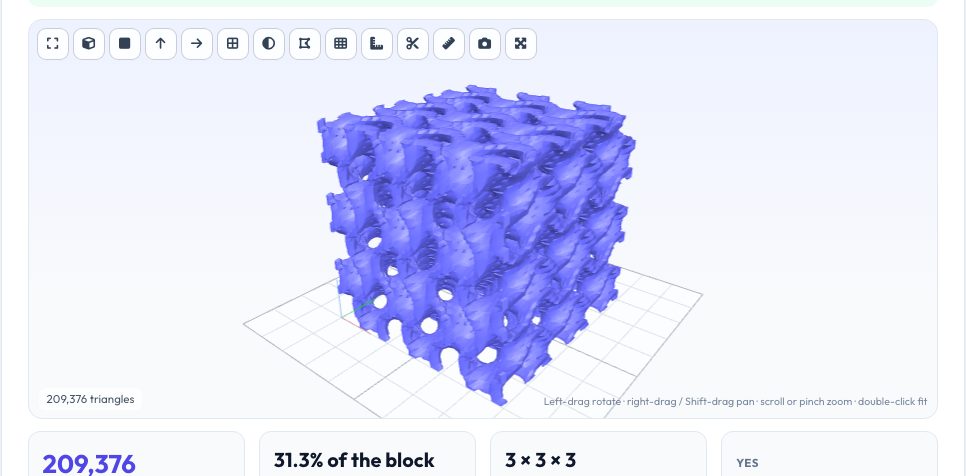
Free Gyroid & TPMS Lattice Generator for 3D Printing
Gyroids and other triply periodic minimal surfaces are the shapes behind modern lightweight lattices: no steep overhangs, even strength in every direction and huge surface area. This generator builds a watertight lattice block of the size, cell period and solid volume you choose using marching tetrahedra, with flat cut faces and no floating fragments.
Pick gyroid, Schwarz P or Schwarz D, choose a thin-wall sheet structure or a skeletal solid network, and download an STL, 3MF or OBJ. Intersect the block with your model in the STL boolean tool to make a lattice-filled part. Everything runs in your browser.
Key features
Three lattice families
Gyroid, Schwarz P and diamond.
Sheet or skeletal
Thin-wall surface or solid network.
Exact solid fraction
Threshold set so volume matches your target.
Watertight output
Closed manifold with fragments removed.
How to use it
- Choose the lattice type and structure.
- Set size, cell period and solid volume.
- Press Generate.
- Download the STL.
Worked example
Example
A 30 × 30 × 30 mm gyroid sheet block with a 10 mm period at 30% solid volume has about 8 cm³ of plastic and weighs roughly 3 g in PLA.
Who uses this tool
Product designers
Lightweight, breathable parts.
Researchers
Test lattice mechanics.
Makers
Filters, heat exchangers and cushioning.
Educators
Show minimal surfaces.
Tips for the best results
- Keep the wall thicker than 0.8 mm for FDM; compute from period × fraction.
- Use cell sizes of 8–15 mm for test pieces.
- Resin printers handle small 3–5 mm cells.
- Drain holes are needed for resin printing.
Common mistakes to avoid
- Choosing cells so small the wall is thinner than the nozzle.
- Setting extreme solid volumes of 5% or less.
- Forgetting that large detail settings create very heavy files.
Why use AZRS QuickFix?
It is 100% free, needs no signup and has no watermark or usage limits. The tool runs in your browser, so what you type stays on your device, and it works on phones, tablets and desktops. New tools are added every week — bookmark this page or browse the full QuickFix toolbox.
Frequently asked questions
Does it need supports?
Usually not.
What is the difference between sheet and skeletal?
Sheet is a thin wall between channels, skeletal is a solid network.
How big can I make it?
Up to 200 mm per side, with detail capped for performance.
Is it manifold?
Yes, it is checked after building.