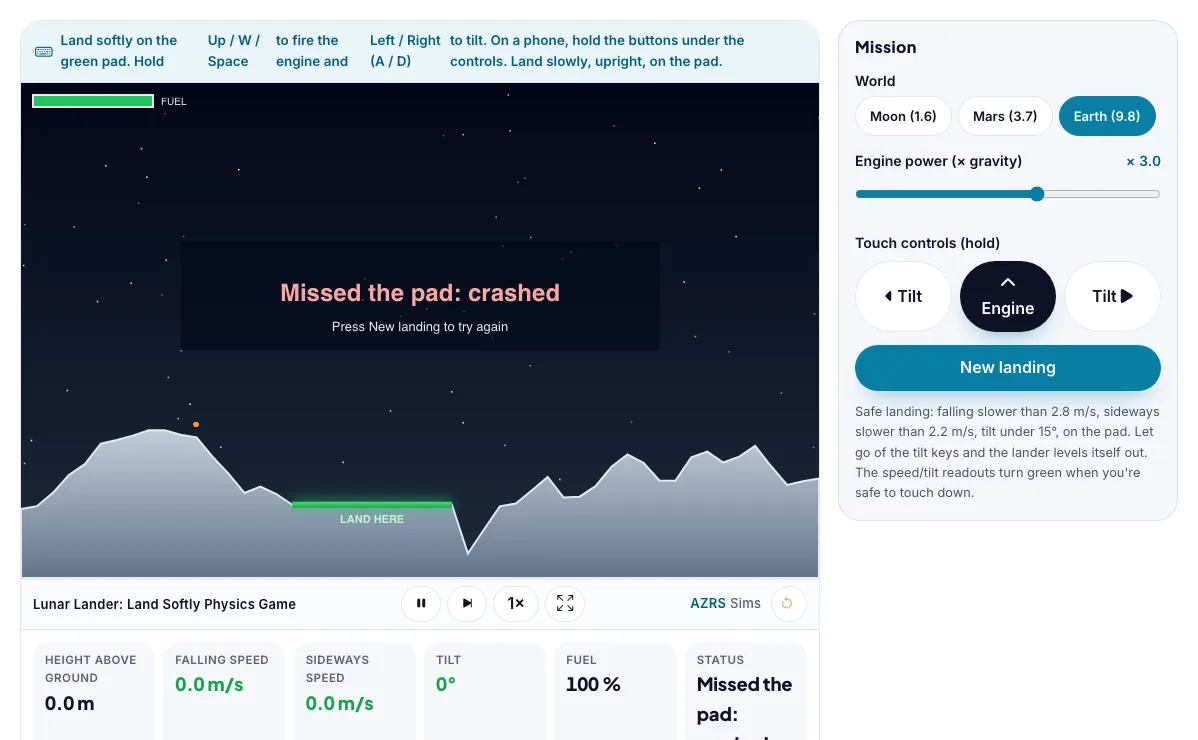
Lunar Lander: Land Softly Physics Game
Fire the engine and tilt the lander to touch down softly on the pad, on the Moon, Mars or Earth.
Land softly on the green pad. Hold Up / W / Space to fire the engine and Left / Right (A / D) to tilt. On a phone, hold the buttons under the controls. Land slowly, upright, on the pad.
What the Lunar Lander: Land Softly Physics Game shows
Fire the engine and tilt the lander to touch down softly on the pad, on the Moon, Mars or Earth. Free, no signup, runs in your browser. Built for physics, the lunar lander: land softly physics game runs instantly in your browser: change a setting or drag an object and the result updates at once, so you learn by trying things out rather than only reading about them.
You fire the engine and tilt the lander to touch down softly. Gravity pulls constantly; thrust must beat it.
How to use the Lunar Lander: Land Softly Physics Game
In the Lunar Lander: Land Softly Physics Game, use the controls to change World, Engine power (× gravity), Touch controls (hold). The simulation reacts instantly.
In the Lunar Lander: Land Softly Physics Game, pick an option such as Moon (1.6), Mars (3.7), Earth (9.8) to switch modes or load an example.
In the Lunar Lander: Land Softly Physics Game, press "◀ Tilt", "▲ Engine", "Tilt ▶", "New landing" to start, reset or change what is happening.
Start with this experiment: Land on the Moon with under 30 percent fuel used. Drag any glowing handle, object or slider with your mouse or finger and the Lunar Lander: Land Softly Physics Game responds in real time.
Change one setting at a time and watch which readout moves, then compare it with this idea: Gravity pulls the lander down at a steady rate, so its downward speed keeps growing.
Things to try
Land on the Moon with under 30 percent fuel used.
Try Mars, then Earth, and raise the engine power to compensate.
Land on the pad with less than 1 m/s falling speed.
Try to land with zero sideways speed.
The science behind it
Gravity pulls the lander down at a steady rate, so its downward speed keeps growing.
Engine thrust gives an upward acceleration that can slow the fall.
Tilting the lander sends some of the thrust sideways.
Weaker gravity, like on the Moon, makes soft landings easier and uses less fuel.
A worked example with real numbers
a = 3000 / 1000 - 1.62 = 1.38 m/s2 upward
Hover needs T = m g = 1620 N
Tips and common mistakes
Tips
- Short bursts save fuel.
- Cut the engine tilt before landing.
Common mistakes
- Burning too early and running out of fuel.
- Landing at an angle even when slow.
Where this is used
SpaceX booster landings, the Apollo Moon landings and Mars rovers all needed exactly this control of thrust, tilt and fuel.
Who is this simulation for?
Physics students in middle school, high school and first-year university, teachers who want a quick demonstration for the projector, and anyone revising for exams. A good first experiment in the Lunar Lander: Land Softly Physics Game: Land on the Moon with under 30 percent fuel used. The key relation to keep an eye on: a = T / m - g (vertical); v = v0 + a t; safe landing needs low speed and near-upright tilt.
For teachers: project the Lunar Lander: Land Softly Physics Game on the board, let students predict the result, then run it together and test this: Try Mars, then Earth, and raise the engine power to compensate. For students: change one thing at a time and write down what changes.
Frequently asked questions
How do rockets land softly?
They fire the engine to slow the fall so the speed is small at touchdown, while keeping the rocket upright.
Why is it harder on Earth?
Gravity is six times stronger than on the Moon, so more thrust and fuel are needed to cancel it.
Is the Lunar Lander: Land Softly Physics Game free to use?
Yes. The Lunar Lander: Land Softly Physics Game is free, needs no signup or download and runs in your web browser. It is part of the Physics group of AZRS simulations.
Does the Lunar Lander: Land Softly Physics Game work on a phone or tablet?
Yes. The Lunar Lander: Land Softly Physics Game takes touch input as well as mouse input, so you can use its 3 adjustable settings with a finger. A larger screen makes the controls and graphs easier to read.