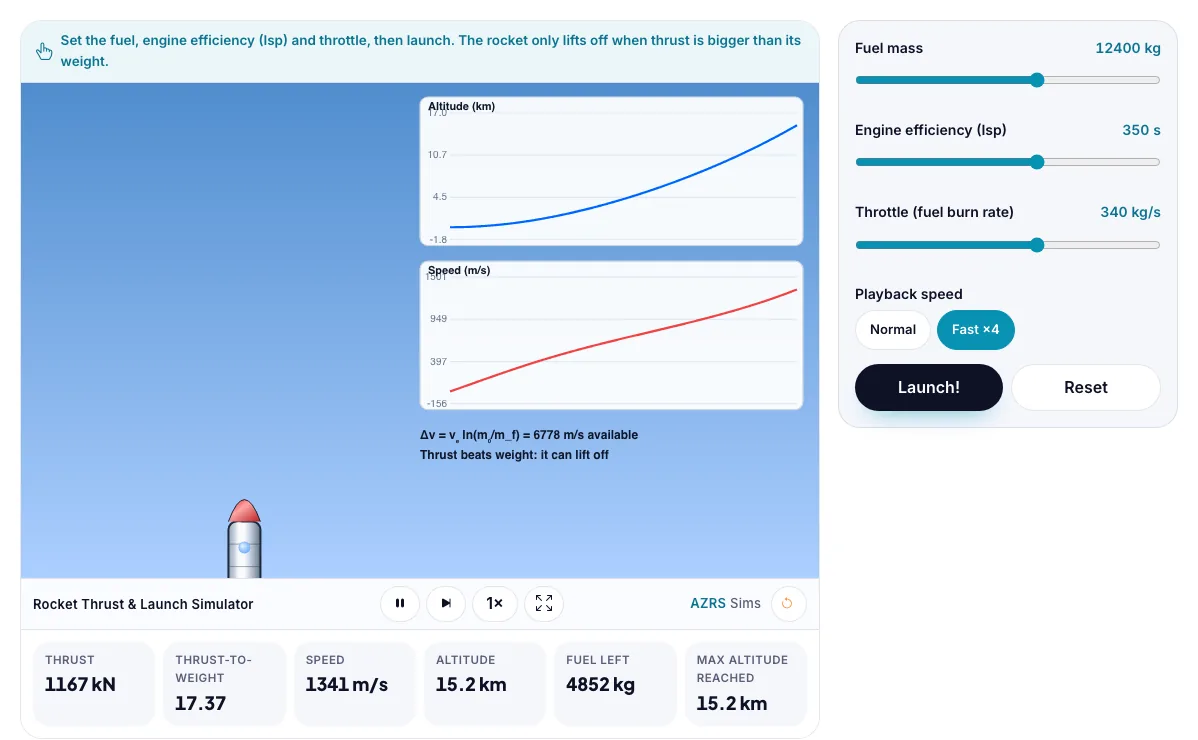
Rocket Thrust & Launch Simulator
Set fuel, engine efficiency and throttle, launch a rocket and see altitude and speed graphs.
Set the fuel, engine efficiency (Isp) and throttle, then launch. The rocket only lifts off when thrust is bigger than its weight.
What the Rocket Thrust & Launch Simulator shows
Set fuel, engine efficiency and throttle, launch a rocket and see altitude and speed graphs. Free, no signup, runs in your browser. Built for engineering, the rocket thrust & launch simulator runs instantly in your browser: change a setting or drag an object and the result updates at once, so you learn by trying things out rather than only reading about them.
A rocket launch with fuel mass, engine efficiency (Isp) and throttle. You see thrust, acceleration and how much speed the burn gives.
How to use the Rocket Thrust & Launch Simulator
In the Rocket Thrust & Launch Simulator, use the controls to change Fuel mass, Engine efficiency (Isp), Throttle (fuel burn rate), Playback speed. The simulation reacts instantly.
In the Rocket Thrust & Launch Simulator, pick an option such as Normal, Fast ×4 to switch modes or load an example.
In the Rocket Thrust & Launch Simulator, press "Launch!", "Reset" to start, reset or change what is happening.
Start with this experiment: Launch with too little throttle and watch it stay on the pad. Drag any glowing handle, object or slider with your mouse or finger and the Rocket Thrust & Launch Simulator responds in real time.
Change one setting at a time and watch which readout moves, then compare it with this idea: Thrust = exhaust speed × mass of fuel burned per second.
Things to try
Launch with too little throttle and watch it stay on the pad.
Double the fuel and compare the height reached.
Raise Isp to 450 s.
The science behind it
Thrust = exhaust speed × mass of fuel burned per second.
A rocket lifts off only if thrust > weight.
Δv = vₑ ln(m₀ / m_f) (the rocket equation).
Burning fuel makes the rocket lighter, so it accelerates faster.
A worked example with real numbers
vₑ = 300 × 9.81 = 2943 m/s
Δv = 2943 × ln 3 = 2943 × 1.0986 = 3233 m/s
Thrust = 100 × 2943 = 294 kN
Gravity and drag lower the speed actually gained.
Tips and common mistakes
Tips
- More fuel gives diminishing returns because you must lift the fuel too.
- Raise Isp: speed gain rises in direct proportion for the same mass ratio.
- Compare a high and a low throttle: the same fuel, different burn time.
Common mistakes
- Thrust does not mean speed; a heavy rocket can have high thrust and slow acceleration.
- A rocket pushes on its own exhaust, not on the air.
- Δv assumes no gravity loss, so real launches fall short of it.
Where this is used
Space agencies use the rocket equation to plan every mission from satellites to Mars.
Who is this simulation for?
Engineering and technology students, makers, robotics clubs and teachers of design and technology. A good first experiment in the Rocket Thrust & Launch Simulator: Launch with too little throttle and watch it stay on the pad. The key relation to keep an eye on: Tsiolkovsky: Δv = vₑ ln(m₀ / m_f), with vₑ = Isp × g₀ and thrust F = ṁ vₑ.
For teachers: project the Rocket Thrust & Launch Simulator on the board, let students predict the result, then run it together and test this: Double the fuel and compare the height reached. For students: change one thing at a time and write down what changes.
Frequently asked questions
What is specific impulse?
A measure of engine efficiency: the exhaust speed divided by g. Higher Isp means more velocity from the same fuel.
Why do rockets need so much fuel?
The rocket equation is logarithmic: to gain more speed you must carry exponentially more fuel.
Is the Rocket Thrust & Launch Simulator free to use?
Yes. The Rocket Thrust & Launch Simulator is free, needs no signup or download and runs in your web browser. It is part of the Engineering group of AZRS simulations.
Does the Rocket Thrust & Launch Simulator work on a phone or tablet?
Yes. The Rocket Thrust & Launch Simulator takes touch input as well as mouse input, so you can use its 4 adjustable settings with a finger. A larger screen makes the controls and graphs easier to read.