Extruder E-Steps, Rotation Distance & Flow Rate Calibration Calculator
Calculate new e-steps, Klipper rotation_distance, flow multiplier and maximum print speed from simple measurements · free, no signup
See Extruder E-Steps, Rotation Distance & Flow Rate Calibration Calculator in action
Free E-Steps, Rotation Distance & Flow Calibration Calculator
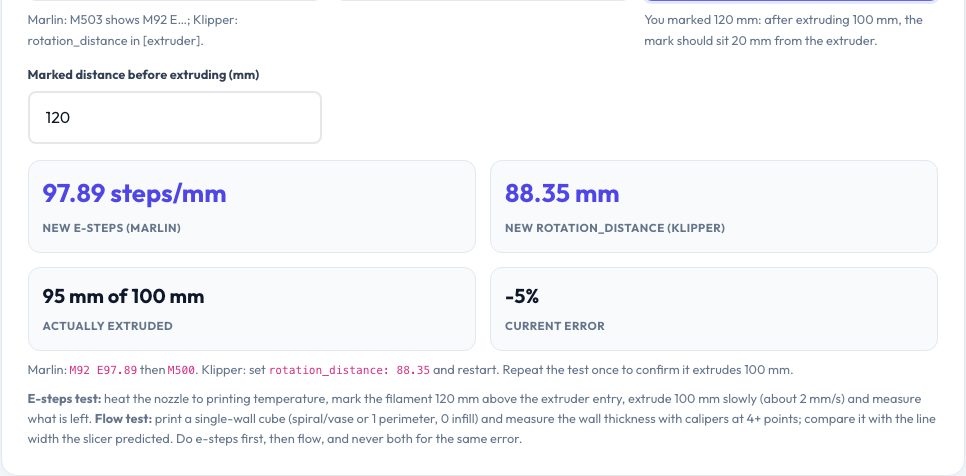
An extruder that pushes 96 mm of filament when asked for 100 mm under-extrudes by 4% — enough to cause weak walls and gaps. The e-steps test fixes that: mark the filament, extrude 100 mm, measure what moved, and the calculator returns the corrected steps/mm for Marlin and the corrected rotation_distance for Klipper, with the exact G-code to apply them.
Flow calibration uses a measured single-wall cube to correct the flow multiplier. The volumetric flow tabs show how much plastic per second your speed, layer height and line width need, compare it with typical hotend limits and give the maximum speed for any flow.
Key features
E-steps and rotation distance
From a 100 mm test.
Flow multiplier
From measured wall thickness.
Volumetric flow check
Compare speed to the hotend limit.
Ready-to-paste commands
M92 E…, M221 S…, rotation_distance.
How to use it
- Do the 100 mm extrusion test.
- Enter current value and measured remaining distance.
- Apply the new value and save.
- Calibrate flow with a single-wall cube.
Worked example
Example
With 93 steps/mm and 20 mm of the mark remaining where 20 was expected, extruded length is exactly 100 mm and the value stays; if 25 mm remained the printer extruded 95 mm and the new e-steps are 97.9.
Who uses this tool
Printer owners
Initial calibration.
Print farms
Standardise machines.
Klipper users
rotation_distance maths.
Troubleshooters
Fix under-extrusion.
Tips for the best results
- Heat the nozzle to printing temperature for the test.
- Extrude slowly (2 mm/s).
- Repeat the test after changing the value.
- Calibrate e-steps before flow.
Common mistakes to avoid
- Changing flow and e-steps for the same error.
- Measuring with a cold nozzle.
- Using the wrong mark length.
Why use AZRS QuickFix?
It is 100% free, needs no signup and has no watermark or usage limits. The tool runs in your browser, so what you type stays on your device, and it works on phones, tablets and desktops. New tools are added every week — bookmark this page or browse the full QuickFix toolbox.
Frequently asked questions
What is rotation_distance?
Millimetres of filament per extruder motor revolution in Klipper.
What is a good flow value?
90–105% for most filaments.
Do I save with M500?
Yes in Marlin.
Is the hotend limit exact?
Limits vary by hotend and filament.