Greenhouse Effect & Earth's Energy Balance
Change the sun, reflectivity and greenhouse gases and see the surface temperature of Earth, Venus, Mars or Snowball Earth.
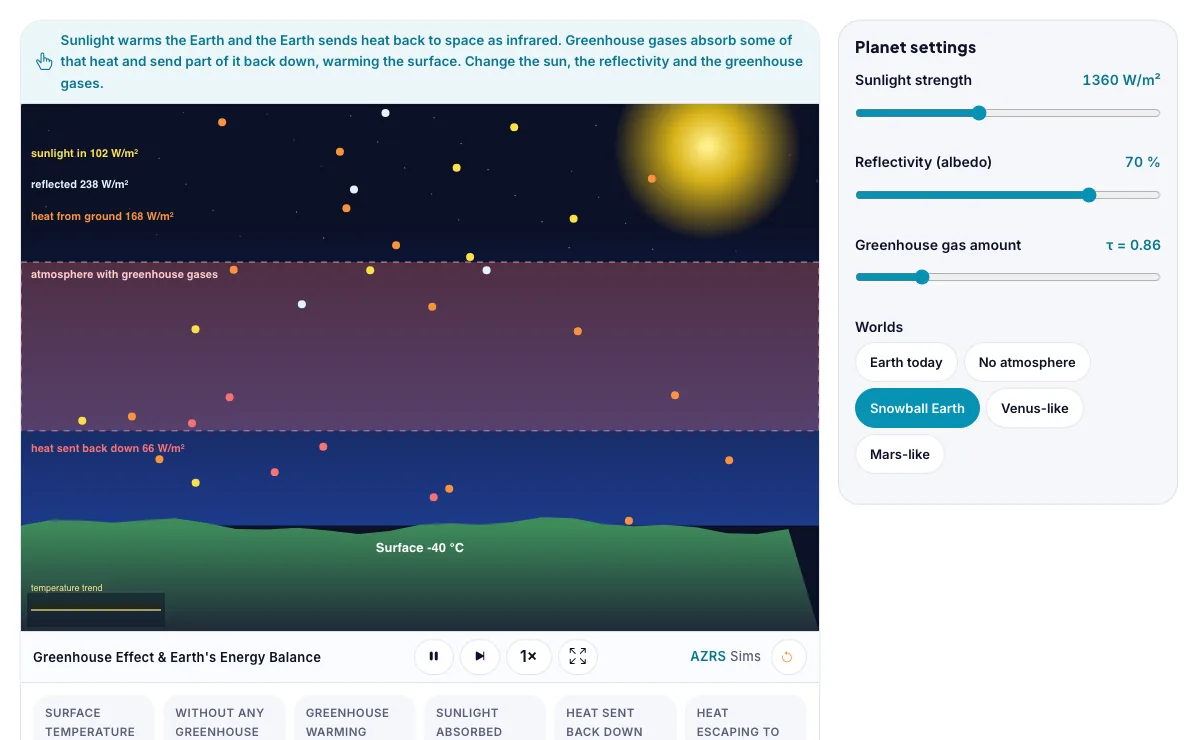
Sunlight warms the Earth and the Earth sends heat back to space as infrared. Greenhouse gases absorb some of that heat and send part of it back down, warming the surface. Change the sun, the reflectivity and the greenhouse gases.
What the Greenhouse Effect & Earth's Energy Balance shows
Change the sun, reflectivity and greenhouse gases and see the surface temperature of Earth, Venus, Mars or Snowball Earth. Works on phones and computers. Built for earth & space, the greenhouse effect & earth's energy balance runs instantly in your browser: change a setting or drag an object and the result updates at once, so you learn by trying things out rather than only reading about them.
Change the Sun, reflectivity and gases to see surface temperature on Earth, Venus, Mars and a snowball Earth.
How to use the Greenhouse Effect & Earth's Energy Balance
In the Greenhouse Effect & Earth's Energy Balance, use the controls to change Sunlight strength, Reflectivity (albedo), Greenhouse gas amount, Worlds. The simulation reacts instantly.
In the Greenhouse Effect & Earth's Energy Balance, pick an option such as Earth today, No atmosphere, Snowball Earth, Venus-like to switch modes or load an example.
Start with this experiment: Choose No atmosphere and compare with Earth today. Drag any glowing handle, object or slider with your mouse or finger and the Greenhouse Effect & Earth's Energy Balance responds in real time.
Change one setting at a time and watch which readout moves, then compare it with this idea: Without any greenhouse effect Earth would average about -18 C.
Things to try
Choose No atmosphere and compare with Earth today.
Raise the greenhouse gas amount a little and see how much the surface warms.
Try Snowball Earth and explain why ice keeps a planet cold.
Compare Venus-like and Mars-like worlds.
The science behind it
Without any greenhouse effect Earth would average about -18 C.
Greenhouse gases absorb heat from the ground and send part of it back down, warming the surface. The more they trap (the optical depth), the hotter it gets.
More reflective surfaces (higher albedo) send more sunlight back to space and cool the planet.
In balance, the heat leaving equals the sunlight absorbed.
A worked example with real numbers
(1 - 0.3) x 1361 / 4 = 238 W/m2
T = (238 / 5.67e-8)^0.25 = 255 K = -18 C
Actual 288 K: greenhouse effect adds about 33 K.
Tips and common mistakes
Tips
- Increase albedo and watch cooling.
- Try Venus.
Common mistakes
- Thinking the greenhouse effect is bad itself; without it Earth is frozen.
- Confusing ozone with greenhouse.
Where this is used
Climate scientists use energy-balance models like this to understand global warming, and it also explains the surface temperatures of other planets.
Who is this simulation for?
Astronomy and earth-science students, and teachers who need a visual model to explain what is happening in the sky. A good first experiment in the Greenhouse Effect & Earth's Energy Balance: Choose No atmosphere and compare with Earth today. The key relation to keep an eye on: balance: (1 - albedo) S / 4 = sigma T^4; Earth without greenhouse = about 255 K.
For teachers: project the Greenhouse Effect & Earth's Energy Balance on the board, let students predict the result, then run it together and test this: Raise the greenhouse gas amount a little and see how much the surface warms. For students: change one thing at a time and write down what changes.
Frequently asked questions
What is the greenhouse effect?
A natural warming caused by gases in the air that absorb infrared heat from the surface and radiate part of it back down.
Why is Venus so hot?
It has a thick carbon dioxide atmosphere with a strong greenhouse effect and it is closer to the Sun.
Is the Greenhouse Effect & Earth's Energy Balance free to use?
Yes. The Greenhouse Effect & Earth's Energy Balance is free, needs no signup or download and runs in your web browser. It is part of the Earth & Space group of AZRS simulations.
Does the Greenhouse Effect & Earth's Energy Balance work on a phone or tablet?
Yes. The Greenhouse Effect & Earth's Energy Balance takes touch input as well as mouse input, so you can use its 4 adjustable settings with a finger. A larger screen makes the controls and graphs easier to read.