Mouse Ears Generator — Anti-Warp Pads for STL Files
Add thin disc pads to the corners of a model to stop warping, without a messy brim · free, no signup
See Mouse Ears Generator — Anti-Warp Pads for STL Files in action
Free Mouse Ears Generator for 3D Printing
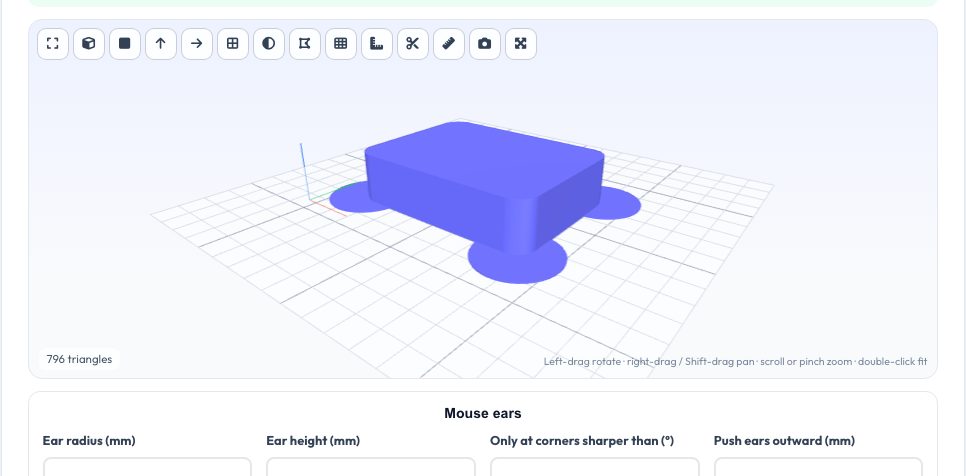
Warping starts at the corners of a part's first layer. Mouse ears are thin discs at those corners that spread the pull over a larger area and hold the corner down. They are cheaper than a full brim, leave a cleaner part and peel off with a knife. This tool finds the flat bottom of your model, takes its convex footprint and adds a disc at every sharp corner.
Set the ear radius, thickness (0.2–0.4 mm is typical), the minimum corner angle and an outward push, preview the result and download a new STL, 3MF or OBJ, or only the ears. The processing runs in your browser.
Key features
Automatic corner detection
Footprint hull corners sharper than your angle get ears.
Adjustable discs
Radius, thickness and outward push.
Ears-only export
Download just the pads to merge in your slicer.
No upload
Runs locally.
How to use it
- Drop in the model lying flat.
- Set radius, height and corner angle.
- Check the preview.
- Download the model with ears.
Worked example
Example
A 40 × 30 mm rectangular base gets four 8 mm radius, 0.3 mm thick ears centred on its corners, increasing the first-layer footprint to 56 × 46 mm.
Who uses this tool
ABS / ASA printers
Hold large prints flat.
Nylon users
Reduce corner lift.
PLA large parts
Stop edge curl on cool beds.
Beginners
A simple way to improve adhesion.
Tips for the best results
- Use two layers of height for stronger hold.
- Increase radius on bigger parts, 10–15 mm.
- Push ears outward slightly if the part corner is rounded.
- Cut ears off with a craft knife.
Common mistakes to avoid
- Using a model without a flat bottom face.
- Making ears too thick so they are hard to remove.
- Placing ears on parts where they would touch other objects on the bed.
Why use AZRS QuickFix?
It is 100% free, needs no signup and has no watermark or usage limits. The tool runs in your browser, so what you type stays on your device, and it works on phones, tablets and desktops. New tools are added every week — bookmark this page or browse the full QuickFix toolbox.
Frequently asked questions
Are the ears fused to the part?
They overlap the corner; slicers merge them into one layer.
Does it work for round parts?
Round bottoms have no corners, so use a brim instead.
What thickness should I use?
0.2–0.4 mm.
Can I export just the ears?
Yes.