Enzyme Activity Simulator
Change substrate, temperature, pH and inhibitors and watch the reaction rate of an enzyme.
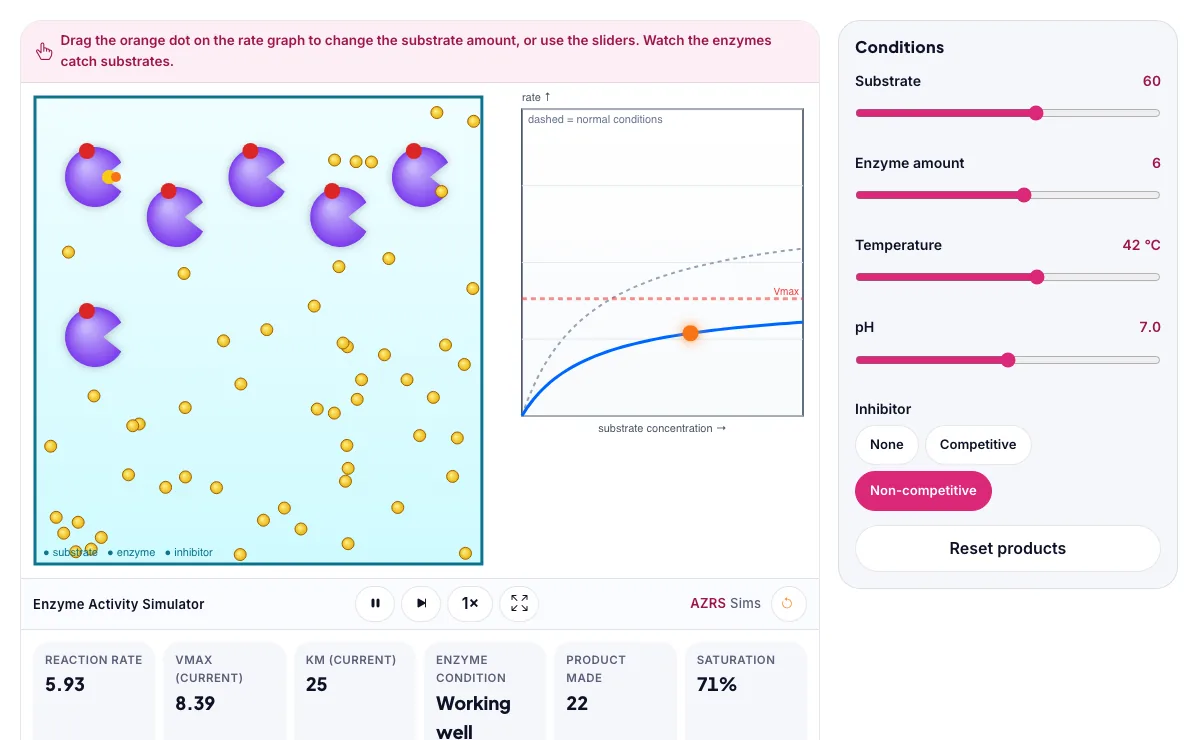
Drag the orange dot on the rate graph to change the substrate amount, or use the sliders. Watch the enzymes catch substrates.
What the Enzyme Activity Simulator shows
Change substrate, temperature, pH and inhibitors and watch the reaction rate of an enzyme. Free, no signup, runs in your browser. Built for biology, the enzyme activity simulator runs instantly in your browser: change a setting or drag an object and the result updates at once, so you learn by trying things out rather than only reading about them.
Substrate, temperature, pH and inhibitors change how fast an enzyme works.
How to use the Enzyme Activity Simulator
In the Enzyme Activity Simulator, use the controls to change Substrate, Enzyme amount, Temperature, pH, Inhibitor. The simulation reacts instantly.
In the Enzyme Activity Simulator, pick an option such as None, Competitive, Non-competitive to switch modes or load an example.
In the Enzyme Activity Simulator, press "Reset products" to start, reset or change what is happening.
Start with this experiment: Raise the temperature past 45 °C. Drag any glowing handle, object or slider with your mouse or finger and the Enzyme Activity Simulator responds in real time.
Change one setting at a time and watch which readout moves, then compare it with this idea: Reaction rate rises with substrate until all enzymes are busy (saturation).
Things to try
Raise the temperature past 45 °C.
Add a competitive inhibitor, then raise substrate.
Move the pH away from 7.
Watch the rate graph flatten at high substrate.
The science behind it
Reaction rate rises with substrate until all enzymes are busy (saturation).
Each enzyme has an optimum temperature and pH; too hot denatures it.
A competitive inhibitor raises Km. A non-competitive inhibitor lowers Vmax.
A worked example with real numbers
At pH 2, pepsin near 100 % activity
At pH 7, pepsin falls to near zero (denatured or ineffective).
Tips and common mistakes
Tips
- Raise temperature past the optimum and see activity drop.
- Add a competitive inhibitor and increase substrate to overcome it.
Common mistakes
- Thinking higher temperature always speeds up enzymes.
- Saying enzymes are used up.
Where this is used
Enzymes are used in washing powders, brewing, cheese making, medicine and diagnostic tests. Many drugs work by inhibiting an enzyme.
Who is this simulation for?
Biology students and teachers who want to explore living systems, populations and genetics interactively and safely. A good first experiment in the Enzyme Activity Simulator: Raise the temperature past 45 °C. The key relation to keep an eye on: rate rises with substrate until active sites saturate; each enzyme has an optimum pH and temperature.
For teachers: project the Enzyme Activity Simulator on the board, let students predict the result, then run it together and test this: Add a competitive inhibitor, then raise substrate. For students: change one thing at a time and write down what changes.
Frequently asked questions
Why do enzymes stop working at high temperature?
Heat changes the shape of the enzyme (it denatures), so the substrate no longer fits the active site.
What is an enzyme inhibitor?
A molecule that slows an enzyme. A competitive inhibitor competes with the substrate for the active site.
Is the Enzyme Activity Simulator free to use?
Yes. The Enzyme Activity Simulator is free, needs no signup or download and runs in your web browser. It is part of the Biology group of AZRS simulations.
Does the Enzyme Activity Simulator work on a phone or tablet?
Yes. The Enzyme Activity Simulator takes touch input as well as mouse input, so you can use its 5 adjustable settings with a finger. A larger screen makes the controls and graphs easier to read.