Chemical Equation Balancer
Practise with 1,700+ real equations, or type your own and balance it with charges.
Separate species with + (spaces around the plus). Use plain numbers for subscripts: Ca(OH)2. For ions write the charge with a caret: Cu^2+, Fe^3+, e^-, SO4^2-. Charge is balanced too.
What the Chemical Equation Balancer shows
Practise with 1,700+ real equations, or type your own and balance it with charges. Free, no signup, runs in your browser. Works on phones and computers. Built for reactions & kinetics, the chemical equation balancer runs instantly in your browser: change a setting or drag an object and the result updates at once, so you learn by trying things out rather than only reading about them.
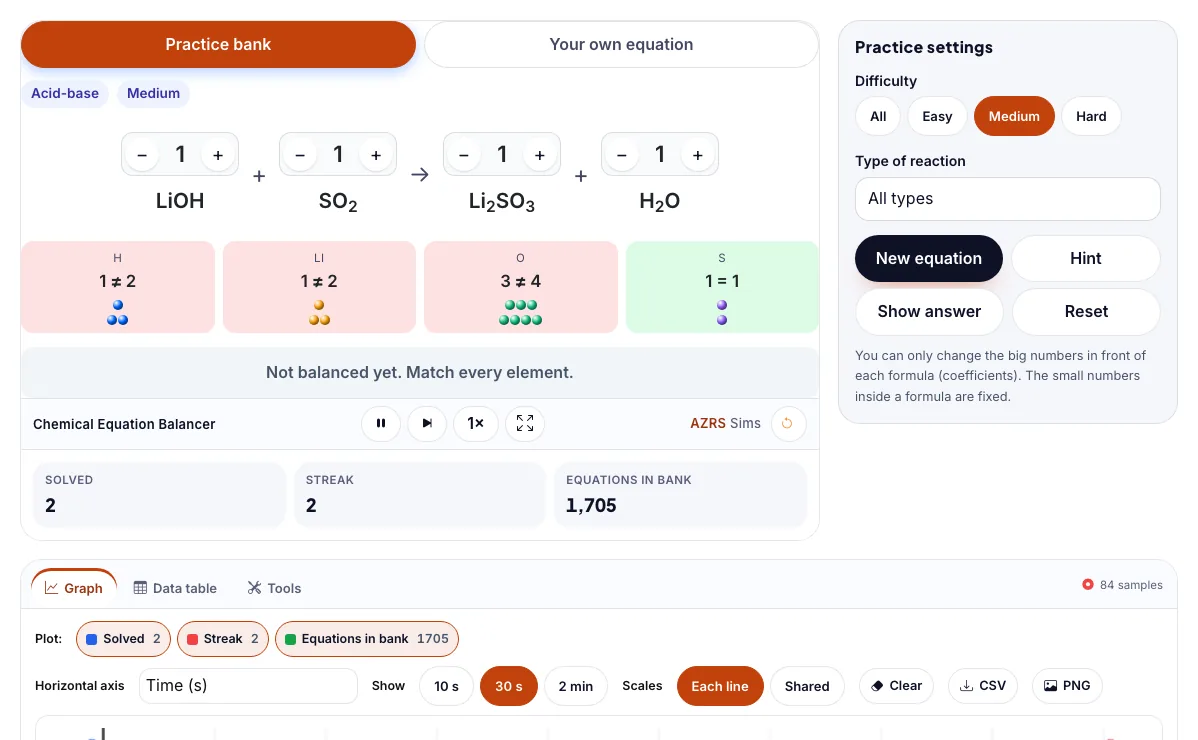
Practise balancing real chemical equations. The sim checks atoms and charges on both sides.
How to use the Chemical Equation Balancer
In the Chemical Equation Balancer, use the controls to change Difficulty, Type of reaction. The simulation reacts instantly.
In the Chemical Equation Balancer, pick an option such as All, Easy, Medium, Hard to switch modes or load an example.
In the Chemical Equation Balancer, press "New equation", "Hint", "Show answer", "Reset" to start, reset or change what is happening.
Start with this experiment: Pick Hard and Combustion, then balance a large hydrocarbon. Drag any glowing handle, object or slider with your mouse or finger and the Chemical Equation Balancer responds in real time.
Change one setting at a time and watch which readout moves, then compare it with this idea: Atoms are neither created nor destroyed, so both sides need the same count of each element.
Things to try
Pick Hard and Combustion, then balance a large hydrocarbon.
Switch to Your own equation and type MnO4^- + Fe^2+ + H^+ -> Mn^2+ + Fe^3+ + H2O. Charge must balance too.
Use Hint when stuck, and try to finish a streak of five without help.
Filter by Acid-base to practise neutralisation reactions.
The science behind it
Atoms are neither created nor destroyed, so both sides need the same count of each element.
Change coefficients, never the subscripts inside a formula.
Balance elements that appear in one compound on each side first, and leave O and H for last.
A worked example with real numbers
4 Fe + 3 O2 -> 2 Fe2O3
Left: 4 Fe, 6 O; right: 4 Fe, 6 O
Tips and common mistakes
Tips
- Balance metals first, hydrogen and oxygen last.
- Use whole-number coefficients.
Common mistakes
- Changing subscripts instead of coefficients.
- Forgetting to count polyatomic ions as a group.
Where this is used
Balancing equations is the first step of every chemistry calculation, from lab yields to industrial reactors, fuels and medicine manufacturing.
Who is this simulation for?
Students learning reaction rates, equilibrium and equations, and teachers who want a visual way to explain what happens to particles. A good first experiment in the Chemical Equation Balancer: Pick Hard and Combustion, then balance a large hydrocarbon. The key relation to keep an eye on: atoms of each element are equal on both sides; charge also balances for ionic equations.
For teachers: project the Chemical Equation Balancer on the board, let students predict the result, then run it together and test this: Switch to Your own equation and type MnO4^- + Fe^2+ + H^+ -> Mn^2+ + Fe^3+ + H2O. Charge must balance too. For students: change one thing at a time and write down what changes.
Frequently asked questions
Why can't I change the subscripts to balance an equation?
Subscripts define what the substance is. Changing H₂O to H₂O₂ makes hydrogen peroxide, a different compound. Only coefficients can change.
What is the law of conservation of mass?
In a chemical reaction the total mass of the reactants equals the total mass of the products, because atoms are only rearranged.
Is the Chemical Equation Balancer free to use?
Yes. The Chemical Equation Balancer is free, needs no signup or download and runs in your web browser. It is part of the Reactions & Kinetics group of AZRS simulations.
Does the Chemical Equation Balancer work on a phone or tablet?
Yes. The Chemical Equation Balancer takes touch input as well as mouse input, so you can use its 2 adjustable settings with a finger. A larger screen makes the controls and graphs easier to read.