STEP / STP to STL Converter
Convert STEP, STP & IGES CAD files to STL, OBJ, 3MF — free, in your browser · free, no signup
See STEP / STP to STL Converter in action
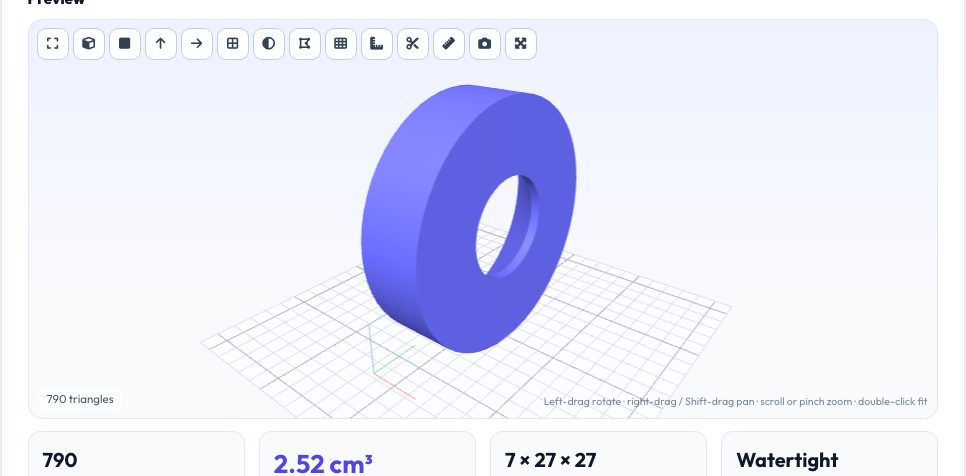
Free STEP / STP to STL Converter (runs in your browser)
STEP (.step / .stp) and IGES (.iges / .igs) files are the neutral formats CAD programs use to exchange true solid models — but 3D printers and slicers only understand triangle meshes such as STL or 3MF. Converting between them means tessellating the exact curved surfaces of the solid into triangles. This converter does exactly that with OpenCascade, the same open-source CAD kernel used by FreeCAD, running as WebAssembly inside your browser tab.
Because the conversion happens locally, your design never leaves your computer — useful for client work, coursework under an academic-integrity policy, or any model you do not want on someone else's server. Pick the mesh quality (draft to ultra), the output format and the output unit, then download. A live 3D preview lets you check the result before it reaches your slicer.
Key features
Real CAD kernel (OpenCascade)
Reads genuine STEP AP203/AP214/AP242 and IGES B-rep geometry — not a renamed file.
STL, 3MF, OBJ, PLY, GLB, AMF, OFF
One upload, any mesh output. Binary or ASCII STL, 3MF for modern slicers.
Quality control
Draft, Normal, Fine and Ultra tessellation so curved parts print smooth without 500 MB files.
Private & batch-ready
Convert several files at once and download a ZIP. Nothing is uploaded.
How to use it
- Export your model from Onshape / Fusion / SolidWorks as STEP and drop it in.
- Choose STL (or 3MF) and a mesh quality — Normal suits most prints.
- Check the 3D preview, size and volume.
- Download the file and open it in your slicer.
Worked example
Example
A 10 × 10 × 10 mm STEP cube converts to a 12-triangle STL with exactly 10 × 10 × 10 mm size and 1.00 cm³ volume. A filleted bracket tessellated at Normal quality becomes a few thousand triangles; at Ultra it can reach hundreds of thousands, so only use Ultra when you really need it.
Who uses this tool
Students and hobbyists with Onshape/Fusion free accounts
Get from a STEP download to a printable STL without installing anything.
Makers sharing models
Turn CAD downloads from manufacturers (STEP) into print-ready meshes.
Engineers handling confidential parts
Convert locally so the geometry never touches a third-party server.
Tips for the best results
- Most CAD packages can export STL directly — but exporting STEP and converting here lets you choose a finer or coarser mesh than the CAD default.
- Check the size in the stats: STEP files carry units, so the converter outputs millimetres by default (what slicers expect).
- For assemblies, all parts are merged into one mesh; export parts separately if you need to print them individually.
- If curves look faceted in the slicer, raise the quality one step and convert again.
Common mistakes to avoid
- Choosing Ultra quality for a simple part and getting a huge, slow-to-slice file.
- Expecting a surface-only IGES (no solid) to become a watertight printable mesh — surfaces need to be closed in CAD first.
- Forgetting that STL carries no unit: always confirm the size in the preview matches your intent.
Why use AZRS QuickFix?
It is 100% free, needs no signup and has no watermark or usage limits. The tool runs in your browser, so what you type stays on your device, and it works on phones, tablets and desktops. New tools are added every week — bookmark this page or browse the full QuickFix toolbox.
Frequently asked questions
Is my STEP file uploaded to a server?
No. The CAD engine is downloaded to your browser (about 7 MB, cached afterwards) and the file is read locally.
Which STEP versions are supported?
STEP AP203, AP214 and AP242 solid models, plus IGES and BREP, via OpenCascade.
Why is the first conversion slower?
The WebAssembly CAD engine has to be downloaded once; later conversions start immediately.
Can it convert STL back to STEP?
Yes — see the STL to STEP converter, which builds a real planar-faced B-rep solid.
What mesh quality should I choose?
Normal for most FDM prints, Fine for smooth cylinders and resin printing, Draft for quick previews.