Keychain & Name Tag STL Maker
Custom keychains and name tags with raised or inlay text, border and key-ring tab — STL / 3MF · free, no signup
See Keychain & Name Tag STL Maker in action
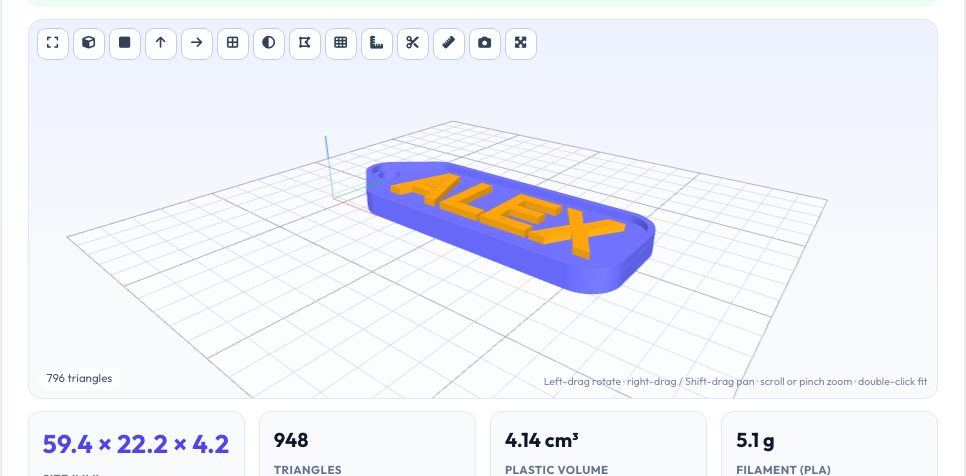
Free Keychain & Name Tag STL Maker
Type a name or a short message and get a ready-to-print keychain in seconds. Choose a tag shape (rounded rectangle, rectangle, pill/dog tag, ellipse or hexagon), a key-ring tab on the left or top (or none for a name plate), the font, the letter height, the padding, the plate and text thickness and an optional border rim. A live 3D preview shows the finished tag with the text in a contrasting colour.
Text can be raised above the plate or flush as a two-colour inlay: the base gets a pocket exactly as deep as the lettering, so letters finish level with the surface and your slicer can print each part in its own colour. Download the combined model or the base and the text separately for multi-material printing. Every file is a clean mesh built in your browser — no upload, no account, no watermark.
Key features
Shapes and ring tabs
Five tag shapes with a left or top ring tab, or no hole.
Raised or inlay text
Raised lettering, or flush letters for two-colour printing.
Border rim
Adjustable rim height and width for a finished look.
Separate colour parts
Download base and text separately for multi-colour slicing.
How to use it
- Type your text and choose the font and size.
- Pick the tag shape, ring tab and thickness.
- Choose raised or flush text and an optional border.
- Download the combined file or the two colour parts.
Worked example
Example
'ALEX' at 12 mm letter height on a rounded tag with 5 mm padding and a left tab is roughly 48 × 22 mm, 3 mm thick with 1.2 mm raised letters — about 2 g of PLA and a 15-minute print.
Who uses this tool
Makers and sellers
Personalised keychains and name tags in minutes.
Schools and clubs
Name badges and bag tags for events.
Gift makers
Custom gifts with initials or short messages.
Tips for the best results
- Letters should be at least 1 mm wide and 0.6 mm tall for a 0.4 mm nozzle.
- For two colours, change filament at the layer where the text starts.
- Use a ring hole of 4.5 mm with 2.4 mm of wall for durability.
- Print the plate flat and use 3 perimeters for toughness.
Common mistakes to avoid
- Making the ring tab wall too thin and snapping it.
- Using very small letter heights that the nozzle cannot resolve.
- Expecting emoji or accented characters — fonts cover basic Latin.
Why use AZRS QuickFix?
It is 100% free, needs no signup and has no watermark or usage limits. The tool runs in your browser, so what you type stays on your device, and it works on phones, tablets and desktops. New tools are added every week — bookmark this page or browse the full QuickFix toolbox.
Frequently asked questions
Which fonts can I use?
Helvetica Bold/Regular and Optima Bold, basic Latin characters.
How do I print two colours?
Download base and text, load as one object and assign colours, or pause at the text layer.
Can I add a logo?
Use the add-text-logo tool on the exported base.
Is it free?
Yes.