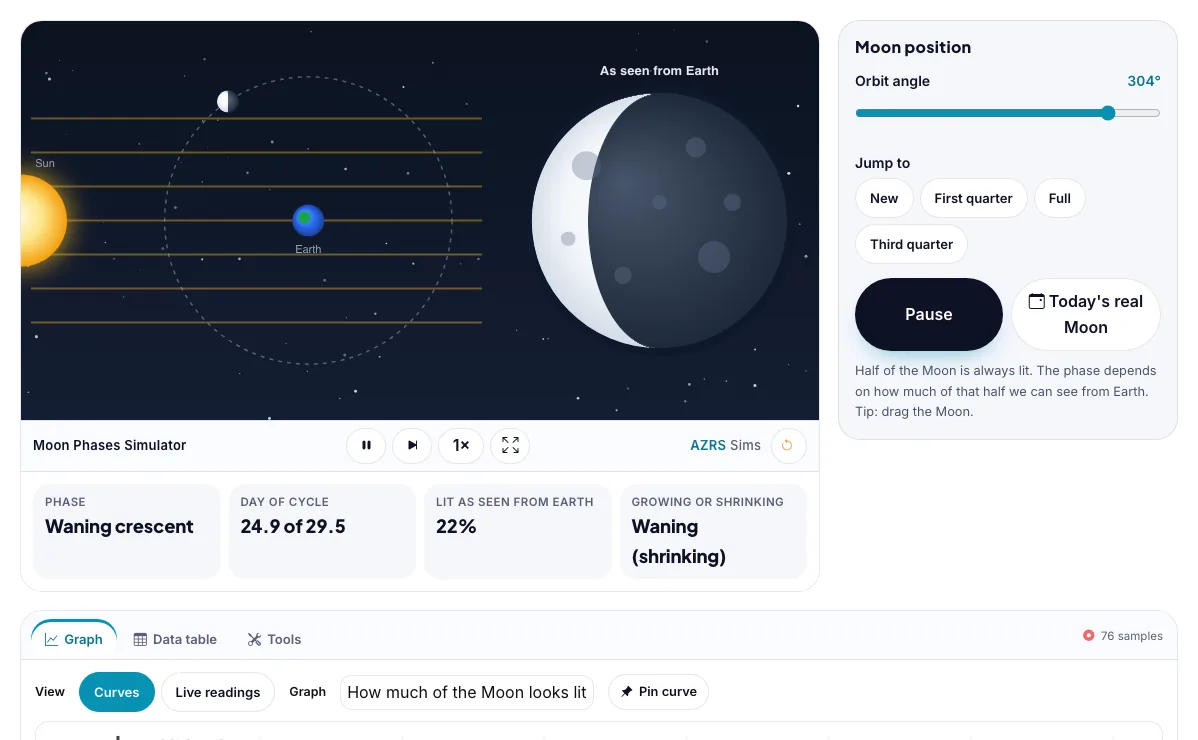
Moon Phases Simulator
Move the Moon around its orbit and see what phase looks like from Earth.
What the Moon Phases Simulator shows
Move the Moon around its orbit and see what phase looks like from Earth. Free, no signup, runs in your browser. Works on phones and computers. Built for earth & space, the moon phases simulator runs instantly in your browser: change a setting or drag an object and the result updates at once, so you learn by trying things out rather than only reading about them.
The Moon orbits Earth and sunlight lights half of it; you see the part facing you as a phase.
How to use the Moon Phases Simulator
In the Moon Phases Simulator, use the controls to change Orbit angle. The simulation reacts instantly.
In the Moon Phases Simulator, pick an option such as New, First quarter, Full, Third quarter to switch modes or load an example.
In the Moon Phases Simulator, press "Animate", "Today's real Moon" to start, reset or change what is happening.
Start with this experiment: Jump to Full Moon. Drag any glowing handle, object or slider with your mouse or finger and the Moon Phases Simulator responds in real time.
Change one setting at a time and watch which readout moves, then compare it with this idea: Half of the Moon is always lit by the Sun. What changes is how much of that lit half faces Earth.
Things to try
Jump to Full Moon.
Animate the whole month.
Find the first quarter.
Drag the Moon around.
The science behind it
Half of the Moon is always lit by the Sun. What changes is how much of that lit half faces Earth.
The full cycle takes about 29.5 days.
Waxing means the lit part is growing, and waning means it is shrinking.
A worked example with real numbers
Day 7.38 (θ = 90°): (1 − 0) / 2 = 50% (first quarter)
Day 3.69 (θ = 45°): (1 − 0.707) / 2 = 14.6% (waxing crescent)
Day 14.77 (θ = 180°): 100% (full).
Tips and common mistakes
Tips
- Drag the Moon and watch the phase.
- Use the jump buttons.
- Press Today's real Moon.
Common mistakes
- Phases are not Earth's shadow; half the Moon is always lit.
- The Moon takes 27.3 days to orbit but 29.5 for a full cycle.
- The Moon always shows the same face.
Where this is used
The Moon's phases guided calendars, tides and festivals throughout history, and astronomers, sailors and farmers still track them.
Who is this simulation for?
Astronomy and earth-science students, and teachers who need a visual model to explain what is happening in the sky. A good first experiment in the Moon Phases Simulator: Jump to Full Moon. The key relation to keep an eye on: Illuminated fraction = (1 − cos θ) / 2, θ = Sun–Earth–Moon elongation; month = 29.53 days.
For teachers: project the Moon Phases Simulator on the board, let students predict the result, then run it together and test this: Animate the whole month. For students: change one thing at a time and write down what changes.
Frequently asked questions
Is the Moon's shadow from Earth causing the phases?
No. Phases come from our viewing angle of the sunlit half. Earth's shadow only falls on the Moon during a lunar eclipse.
What is the difference between a crescent and a gibbous Moon?
A crescent shows less than half of the disc lit, while a gibbous shows more than half.
Is the Moon Phases Simulator free to use?
Yes. The Moon Phases Simulator is free, needs no signup or download and runs in your web browser. It is part of the Earth & Space group of AZRS simulations.
Does the Moon Phases Simulator work on a phone or tablet?
Yes. The Moon Phases Simulator takes touch input as well as mouse input, so you can use its 1 adjustable settings with a finger. A larger screen makes the controls and graphs easier to read.