
Free HTML Formatter
Beautify messy markup, minify it for production, or validate structure. Your HTML is processed on our server with a 512 KB limit and CSRF protection, and shown only as escaped text.
Free HTML Formatter: Beautify, Minify and Validate HTML
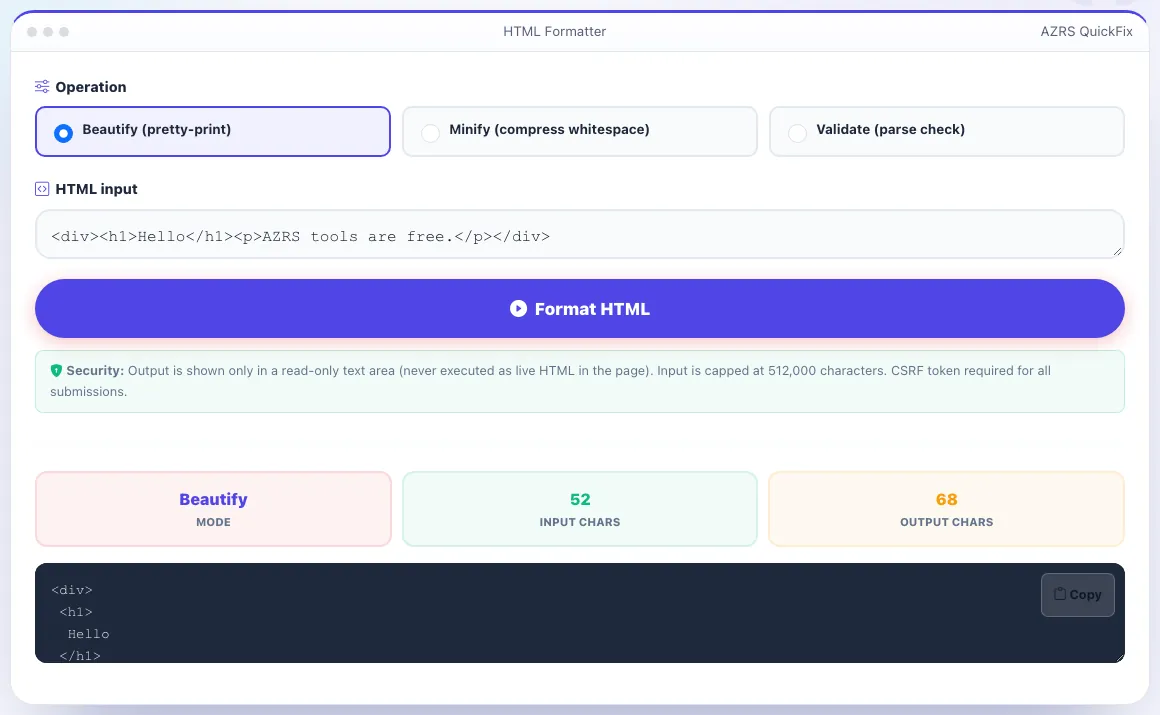
This HTML formatter takes a snippet or a whole page and does one of three things: it beautifies the markup with consistent indentation, it minifies it by collapsing whitespace, or it validates that the document parses. Paste your HTML, pick the operation, press Format HTML and copy the result from the output box.
Your markup is sent to our server, parsed there and returned as plain text. The output is shown only in a read-only text area and is never inserted into the page as live HTML, so scripts inside your markup do not run. Input is capped at 512,000 characters per request.
Use it in 4 steps
Paste your HTML into the input box (a fragment such as a single div works as well as a full page).
Choose Beautify, Minify or Validate.
Click Format HTML and read the result and the input and output character counts.
Copy the output with the Copy button.
What each mode does
Beautify
Re-indents nested tags so the structure is readable. Useful for minified or machine-generated HTML you need to read or diff.
Minify
Collapses runs of whitespace and removes the whitespace between tags to shrink the file. Comments are kept.
Validate
Parses the input and reports how many elements it found. It confirms the markup parses; it is not a full W3C conformance check.
Safe output
Results appear only as escaped text in a read-only box, never as rendered HTML.
Worked example
Input: <div>\n <p> Hello <b>world</b> </p>\n <!-- note -->\n</div>. Minify returns <div><p> Hello <b>world</b></p><!-- note --></div>. Validate returns: HTML parsed successfully (3 elements), counting the div, p and b. Beautify of <div><p>hi</p></div> returns the same tags on separate lines, each nested level indented one more space.
Who uses this tool
Front-end developers
Make a minified template readable before editing it, or shrink a snippet before pasting it into a CMS field.
Email and CMS editors
Clean up pasted markup so the structure is easy to check by eye.
Students
See how nested elements relate by viewing them indented one level per child.
Tips for the best results
- Beautify before you diff two versions of a page so formatting noise does not hide real changes.
- Run Validate first if output looks odd: a parse problem often explains it.
- Keep the original. Minify is not reversible, because the original whitespace is gone.
- For very large pages, split the markup: the limit is 512,000 characters per request.
Common mistakes to avoid
- Expecting Validate to prove W3C compliance. It checks that the markup parses and counts elements, nothing more.
- Pasting a page with inline scripts and expecting them to run. Output is text only.
- Minifying text inside pre or textarea blocks and assuming the spacing is preserved. Check those blocks after minifying.
Frequently asked questions
Is the HTML formatter free?
Yes. It is free with no signup.
Is my HTML stored?
The markup is processed to produce the result and is not kept permanently. Logged-in users may have optional private history entries.
Does it fix broken HTML?
The parser normalises markup the way browsers do, so unclosed tags are tidied in the output. Validate only confirms that the input parses.
What is the size limit?
512,000 characters per request.
Will scripts in my HTML run?
No. The result is displayed as escaped text in a read-only box.
Does Minify remove comments?
No. In the example above the comment survives minification. Whitespace is what gets collapsed.
Free, fast and private by design
No signup, no watermark. New AZRS tools are added every week.
More free tools
Sample
The HTML Formatter with sample data entered and the result showing.
What does the HTML Formatter do? See how it works