
Explore the Solar & Lunar Eclipse Geometry Simulator
Move the Moon through its real tilted orbit and see exactly why eclipses need both the right phase AND the right node crossing.
- Free to use
- No signup
- Nothing to install
- Runs in your browser
Illustration. Open the tool for the real thing.
See it in action
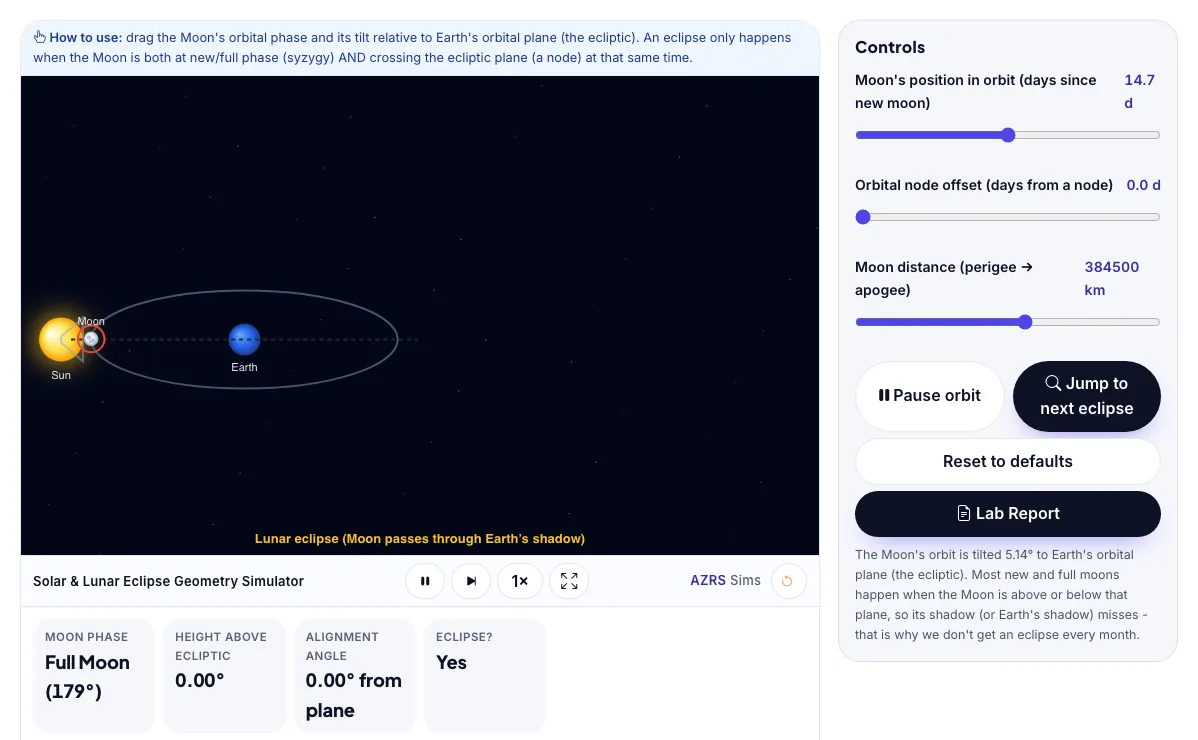
The Solar & Lunar Eclipse Geometry Simulator with sample data entered and the result showing.
What is the Solar & Lunar Eclipse Geometry Simulator?
Move the Moon through its real tilted orbit and see exactly why eclipses need both the right phase AND the right node crossing. It runs in your browser, so a change to a setting or a drag on an object shows up at once.
Astronomers predict eclipses centuries in advance using exactly this combination of orbital phase, node timing and distance, which is also why total solar eclipses are visible from only a narrow path on Earth.
3 steps to your result
Open the tool and follow along. Nothing to install.
What you get
An eclipse needs syzygy: the Sun, Earth and Moon nearly in a straight line, which only happens at new moon (solar eclipse) or full moon (lunar eclipse).
The Moon's orbit is tilted about 5.14° to Earth's orbital plane (the ecliptic), so most new and full moons pass above or below the Sun-Earth line and no eclipse occurs.
An eclipse also needs the Moon to be near a node - where its tilted orbit crosses the ecliptic plane - at the same time as syzygy.
Set phase to new moon (0 days) with the node offset at 0 and watch for a solar eclipse.
Keep the same alignment but drag the distance slider to apogee and watch it become annular.
Set phase to full moon (about 14.75 days) with node offset near 0 for a lunar eclipse.
Used for
Pick one to see how it fits.
Teachers
For teachers: project the Solar & Lunar Eclipse Geometry Simulator on the board, let students predict the result, then run it together and test this: Keep the same alignment but drag the distance slider to apogee and watch it become annular. For students: change one thing at a time and write down what changes.
Try it freeHow it compares
A plain look at this tool next to the usual alternative.
| This simulation | Textbook diagram | |
|---|---|---|
| Interactive | Drag, tap and change settings | Fixed picture |
| Install | Nothing to install | Not needed |
| Cost | Free to use | Depends on the book |
Questions people ask
Why doesn't a solar eclipse happen every single new moon?
The Moon's orbit is tilted about 5.14° to the ecliptic, so on most months the new moon passes above or below the Sun as seen from Earth; only when a new moon coincides with the Moon being near one of its two orbital nodes does its shadow actually reach Earth.
What determines whether a solar eclipse is total or annular?
It depends on the Moon's distance from Earth at that moment: near perigee the Moon's apparent size exceeds the Sun's and fully covers it (total), while near apogee the Moon looks smaller than the Sun and leaves a bright ring visible around it (annular).
Is the Solar & Lunar Eclipse Geometry Simulator free to use?
Yes. The Solar & Lunar Eclipse Geometry Simulator is free, needs no signup or download and runs in your web browser. It is part of the Astronomy group of AZRS simulations.
Does the Solar & Lunar Eclipse Geometry Simulator work on a phone or tablet?
Yes. The Solar & Lunar Eclipse Geometry Simulator takes touch input as well as mouse input, so you can use its 3 adjustable settings with a finger. A larger screen makes the controls and graphs easier to read.
How do I use the Solar & Lunar Eclipse Geometry Simulator?
1. In the Solar & Lunar Eclipse Geometry Simulator, use the controls to change Moon's position in orbit (days since new moon), Orbital node offset (days from a node), Moon distance (perigee → apogee). The simulation reacts instantly. 2. In the Solar & Lunar Eclipse Geometry Simulator, press "▶ Animate orbit", "Jump to next eclipse" to start, reset or change what is happening. 3. Start with this experiment: Set phase to new moon (0 days) with the node offset at 0 and watch for a solar eclipse. Drag any glowing handle, object or slider with your mouse or finger and the Solar & Lunar Eclipse Geometry Simulator responds in real time. 4. Change one setting at a time and watch which readout moves, then compare it with this idea: An eclipse needs syzygy: the Sun, Earth and Moon nearly in a straight line, which only happens at new moon (solar eclipse) or full moon (lunar eclipse).
More free tools
Related to the Solar & Lunar Eclipse Geometry Simulator.
Try the Solar & Lunar Eclipse Geometry Simulator now
Move the Moon through its real tilted orbit and see exactly why eclipses need both the. Free to use.
Try it free