
Open the Thin Content Detector
Enter a domain and this tool crawls it (up to 100 pages), counts the real word count of each page's content, and flags anything under roughly 300 words as thin content — the kind of page
- Free to use
- No signup
- Nothing to install
- Works in any modern browser
A crawl of an e-commerce category turns up 14 product pages under 150 words each — flagged as thin content, with a recommendation to add specifications, usage details and FAQs to each.Open the Thin Content Detector
Illustration. Open the tool for the real thing.
See it in action
Sample input: WEBSITE DOMAIN = example.com; MAX PAGES = 50. Pressed Analyze Now.
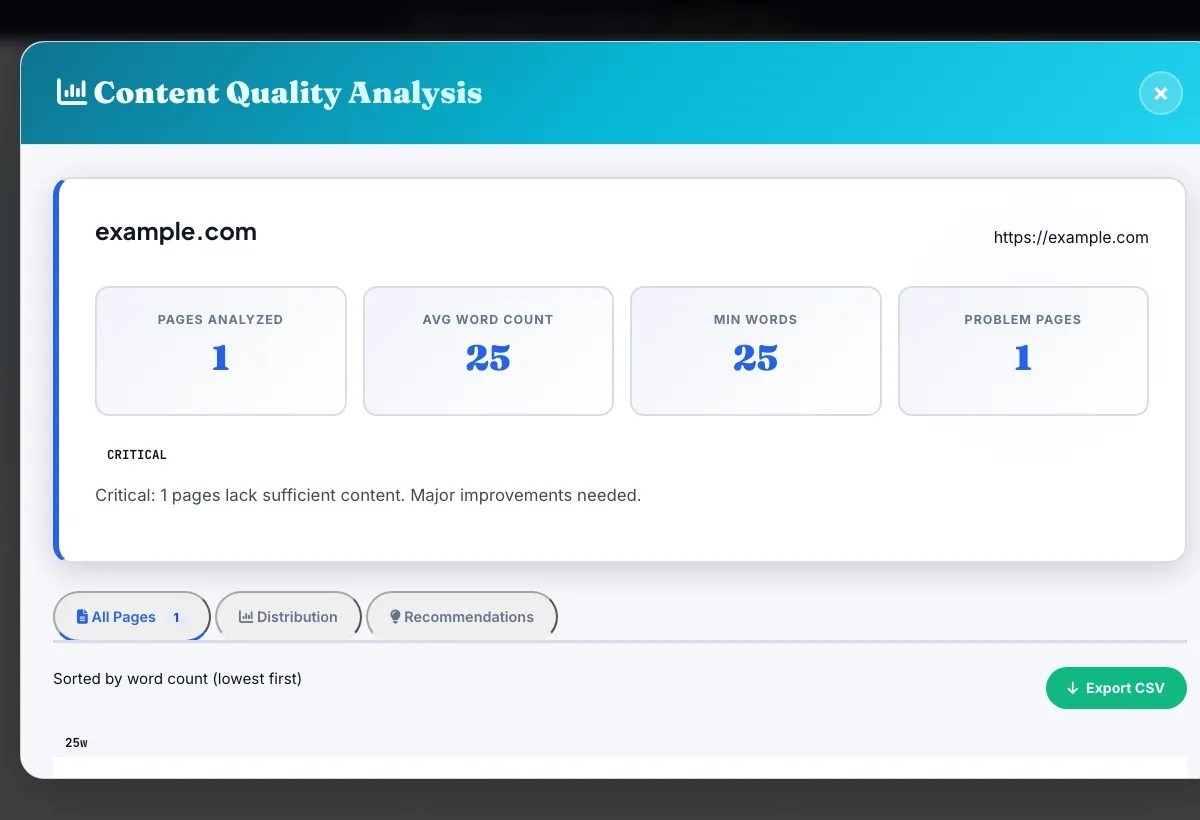
What is the Thin Content Detector?
Enter a domain and this tool crawls it (up to 100 pages), counts the real word count of each page's content, and flags anything under roughly 300 words as thin content — the kind of page that offers too little substance to compete in search results or satisfy a visitor.
Rather than guessing which pages might be thin, this gives you an exact word count per crawled page, so you can prioritize which ones genuinely need expanding, merging with another page, or removing from the index entirely.
3 steps to your result
Open the tool and follow along. Nothing to install.
What you get
Every crawled page gets an actual word count, not an estimate.
Pages under the ~300-word threshold are called out directly as at-risk.
Enough to cover a full blog, product catalog section, or small site in one pass.
See thin pages sorted so the most urgent gaps are easy to act on first.
AZRS tools are free to open and use.
It opens in your browser, so there is nothing to download.
Used for
Pick one to see how it fits.
E-commerce site owners
Spot thin product descriptions across a large catalog without opening every listing manually.
Try it freeContent teams doing a site audit
Prioritize which old, short articles need expansion before a broader content refresh.
Try it freeSEO specialists after a Panda-style quality review
Get a concrete, page-by-page list of low-content pages instead of a general warning.
Try it freeHow it compares
A plain look at this tool next to the usual alternative.
| This seo tool | Desktop software | |
|---|---|---|
| Install | Nothing to install | Usually an app or program to install |
| Account | No signup | Depends on the product |
| Cost | Free to use | Free or paid, depends on the product |
Questions people ask
What word count counts as thin content?
This tool flags pages under roughly 300 words, a widely used general threshold, though competitive topics often need far more to rank.
How many pages does it check?
Up to 100 pages, discovered by crawling internal links from the domain you enter.
Does thin content actually hurt rankings?
Yes — pages with very little substantive content can trigger quality-related ranking suppression and generally convert and rank worse than substantive pages.
What's the fix for a flagged thin page?
Expand it with real, useful detail, merge it into a related page that covers the topic more completely, or noindex it if it can't reasonably be expanded.
Is there a minimum word count that guarantees good rankings?
No — there's no fixed minimum that guarantees ranking; 600+ words is generally a safer baseline for informational content, with competitive topics often needing 1,500-3,000+.
More free tools
Related to the Thin Content Detector.
Try the Thin Content Detector now
Enter a domain and this tool crawls it (up to 100 pages), counts the real word count of. Free to use.
Try it free