
Explore the Fluid Pipe Network & Pump Sizing Lab
Size a pipe run and a centrifugal pump, watch water flow through the pipe live, and see exactly where the pump curve. Works on phones and computers.
- Free to use
- No signup
- Nothing to install
- Runs in your browser
Illustration. Open the tool for the real thing.
See it in action
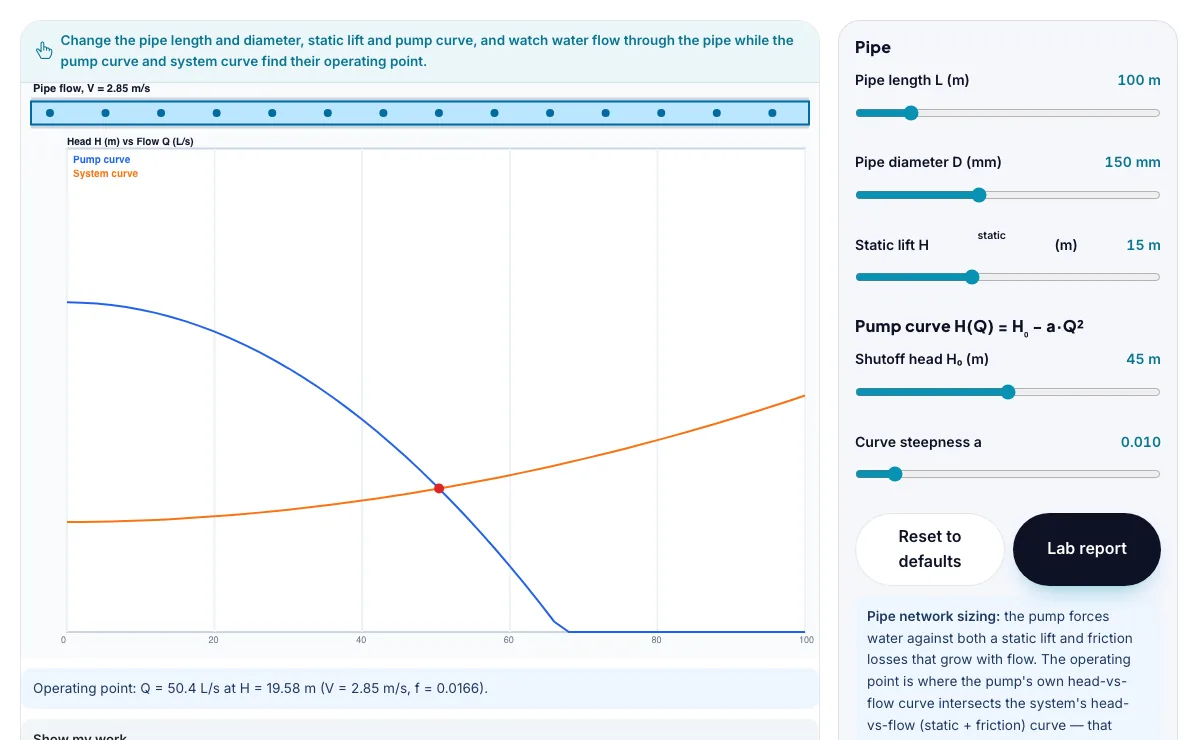
The Fluid Pipe Network & Pump Sizing Lab with sample data entered and the result showing.
What is the Fluid Pipe Network & Pump Sizing Lab?
Size a pipe run and a centrifugal pump, watch water flow through the pipe live, and see exactly where the pump curve and system curve meet to set the real operating flow and head. It runs in your browser, so a change to a setting or a drag on an object shows up at once.
Mechanical and civil engineers run exactly this pump-curve/system-curve intersection check when sizing pumps for water supply networks, HVAC chilled-water loops, irrigation systems and industrial process piping, since an oversized or undersized pump wastes energy or starves the system of flow.
3 steps to your result
Open the tool and follow along. Nothing to install.
What you get
A pipe's friction head loss follows the Darcy-Weisbach equation hf = f(L/D)(V^2/2g), where the friction factor f depends on the Reynolds number and pipe roughness.
The system curve (static lift plus friction loss, which grows roughly with the square of flow) rises with flow rate, while a centrifugal pump's curve falls with flow rate.
The real operating point of a pump-and-pipe system is wherever those two curves intersect - not simply the pump's rated flow on its datasheet.
Try the 40 L/s operating-flow challenge by widening or shortening the pipe.
Try the 35 m operating-head challenge by narrowing or lengthening the pipe until the pump throttles down.
Drag the pump curve steepness and watch the intersection point slide along the system curve.
Used for
Pick one to see how it fits.
Engineering learners
Engineering and technology students, makers, robotics clubs and teachers of design and technology.
Try it freeTeachers
For teachers: project the Fluid Pipe Network & Pump Sizing Lab on the board, let students predict the result, then run it together and test this: Try the 35 m operating-head challenge by narrowing or lengthening the pipe until the pump throttles down. For students: change one thing at a time and write down what changes.
Try it freeHow it compares
A plain look at this tool next to the usual alternative.
| This simulation | Textbook diagram | |
|---|---|---|
| Interactive | Drag, tap and change settings | Fixed picture |
| Install | Nothing to install | Not needed |
| Cost | Free to use | Depends on the book |
Questions people ask
Why can't you just read a pump's flow rate off its datasheet without knowing the pipe system it's connected to?
A pump's datasheet only describes its own head-versus-flow curve; the actual flow it delivers depends on where that curve intersects the specific system's head-versus-flow curve (static lift plus friction loss), which is different for every pipe length, diameter and roughness - the same pump delivers very different flow through a short fat pipe than a long thin one.
Why does narrowing a pipe reduce the operating flow rate more than it might seem to?
A narrower pipe raises velocity for the same flow, and friction head loss scales with velocity squared, so the system curve rises much more steeply with flow; this steeper curve intersects the falling pump curve at a noticeably lower flow rate, not just a proportionally smaller one.
Is the Fluid Pipe Network & Pump Sizing Lab free to use?
Yes. The Fluid Pipe Network & Pump Sizing Lab is free, needs no signup or download and runs in your web browser. It is part of the Engineering group of AZRS simulations.
Does the Fluid Pipe Network & Pump Sizing Lab work on a phone or tablet?
Yes. The Fluid Pipe Network & Pump Sizing Lab takes touch input as well as mouse input, so you can use its 5 adjustable settings with a finger. A larger screen makes the controls and graphs easier to read.
How do I use the Fluid Pipe Network & Pump Sizing Lab?
1. In the Fluid Pipe Network & Pump Sizing Lab, use the controls to change Pipe length L (m), Pipe diameter D (mm), Static lift Hstatic (m), Shutoff head H₀ (m), Curve steepness a. The simulation reacts instantly. 2. Start with this experiment: Try the 40 L/s operating-flow challenge by widening or shortening the pipe. Drag any glowing handle, object or slider with your mouse or finger and the Fluid Pipe Network & Pump Sizing Lab responds in real time. 3. Change one setting at a time and watch which readout moves, then compare it with this idea: A pipe's friction head loss follows the Darcy-Weisbach equation hf = f(L/D)(V^2/2g), where the friction factor f depends on the Reynolds number and pipe roughness.
More free tools
Related to the Fluid Pipe Network & Pump Sizing Lab.
Try the Fluid Pipe Network & Pump Sizing Lab now
Size a pipe run and a centrifugal pump, watch water flow through the pipe live, and see. Free to use.
Try it free