
Explore the LED Circuit Designer & Resistor Calculator
Build LED circuits with a battery, resistor, LED, switch and meters, watch real current and brightness, break them on purpose.
- Free to use
- No signup
- Nothing to install
- Runs in your browser
Illustration. Open the tool for the real thing.
See it in action
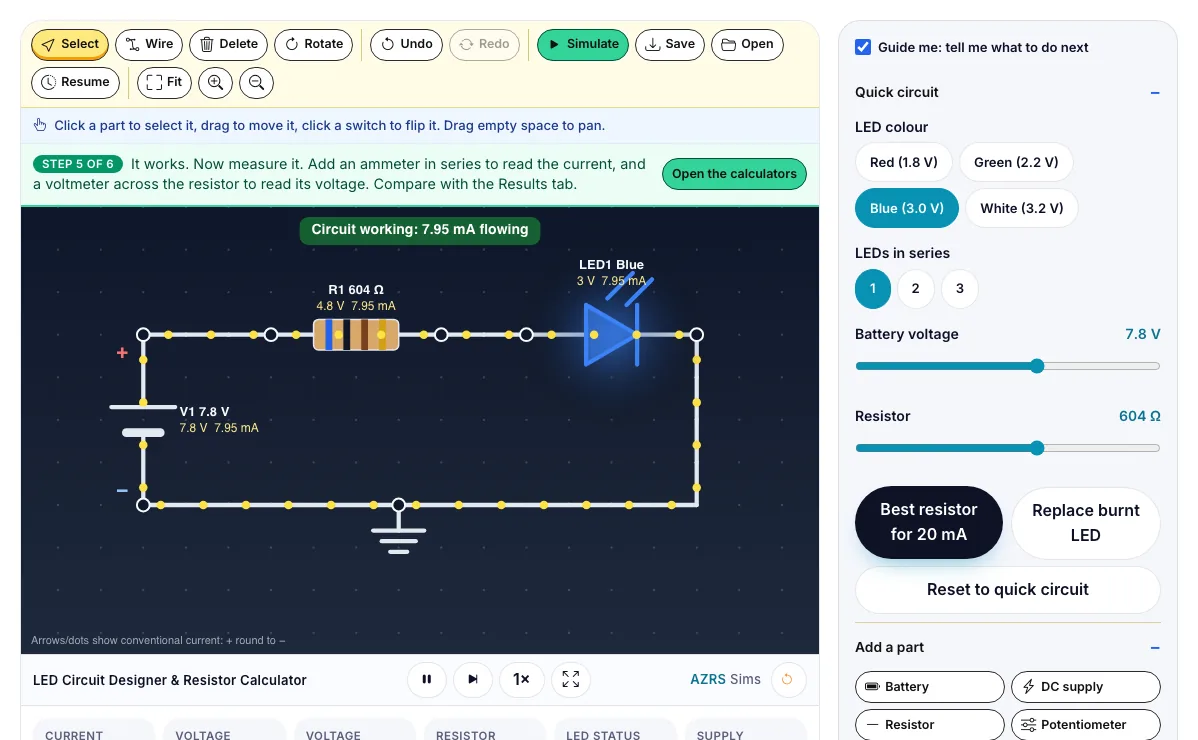
The LED Circuit Designer & Resistor Calculator with sample data entered and the result showing.
What is the LED Circuit Designer & Resistor Calculator?
Build LED circuits with a battery, resistor, LED, switch and meters, watch real current and brightness, break them on purpose, and use 11 resistor calculators. It runs in your browser, so a change to a setting or a drag on an object shows up at once.
Every torch, phone indicator, traffic light, TV backlight and Arduino project uses a current-limited LED, and the same nodal analysis, resistor networks, dividers and tolerance checks are used to design real circuit boards.
3 steps to your result
Open the tool and follow along. Nothing to install.
What you get
An LED needs a series resistor to limit its current: R = (supply voltage − LED voltage) ÷ current.
Ohm's law, V = I × R, links the voltage, current and resistance of every resistor in the circuit.
Series resistors add; parallel resistors share the voltage and the total is smaller than the smallest.
Leave the 5 V, 150 ohm circuit and press Best resistor for 20 mA.
Drag the battery voltage up until the LED burns, then press Replace burnt LED.
Load Lesson 2 and close the switch to see why an LED needs a resistor.
Used for
Pick one to see how it fits.
Engineering learners
Engineering and technology students, makers, robotics clubs and teachers of design and technology.
Try it freeTeachers
For teachers: project the LED Circuit Designer & Resistor Calculator on the board, let students predict the result, then run it together and test this: Drag the battery voltage up until the LED burns, then press Replace burnt LED. For students: change one thing at a time and write down what changes.
Try it freeHow it compares
A plain look at this tool next to the usual alternative.
| This simulation | Textbook diagram | |
|---|---|---|
| Interactive | Drag, tap and change settings | Fixed picture |
| Install | Nothing to install | Not needed |
| Cost | Free to use | Depends on the book |
Questions people ask
How do I choose a resistor for an LED?
Subtract the LED's forward voltage from the supply, then divide by the current you want, usually 10 to 20 mA. For 9 V, a 2 V LED and 20 mA that is 350 ohms, so use the nearest standard value, 360 ohms, which gives 19.4 mA.
Why does an LED burn out without a resistor?
Once an LED conducts, its resistance is tiny, so the current is limited only by the battery. The current soars past the LED's maximum and it overheats. Try it in the simulator with the switch.
How does the simulator work out the currents?
It builds the circuit you draw into a network, then solves it with Modified Nodal Analysis, the method used in circuit simulators such as SPICE. It finds every node voltage, then each current and power. The results were checked against an independent NumPy solver.
How do I read a resistor colour code?
Read the bands from the end nearest the edge. On a 4-band resistor the first two bands are digits, the third is the multiplier and the fourth is the tolerance, so brown, black, red, gold is 10 × 100 = 1 kΩ ±5%. The colour code calculator works in both directions and also handles 5- and 6-band resistors.
What are E12, E24 and E96 resistor values?
They are the standard values that resistors are made in, with 12, 24 or 96 steps per decade. If you calculate 347 ohms, the nearest E12 value is 330, E24 is 360 and E96 is 348. The E-series calculator shows the nearest lower, nearest and nearest higher value.
More free tools
Related to the LED Circuit Designer & Resistor Calculator.
Try the LED Circuit Designer & Resistor Calculator now
Build LED circuits with a battery, resistor, LED, switch and meters, watch real current. Free to use.
Try it free