
Explore the Gear Train & Mechanical Advantage Designer
Build a real two-stage compound gear train, watch the gears mesh and turn, and read off the true speed and torque the math predicts.
- Free to use
- No signup
- Nothing to install
- Runs in your browser
Illustration. Open the tool for the real thing.
See it in action
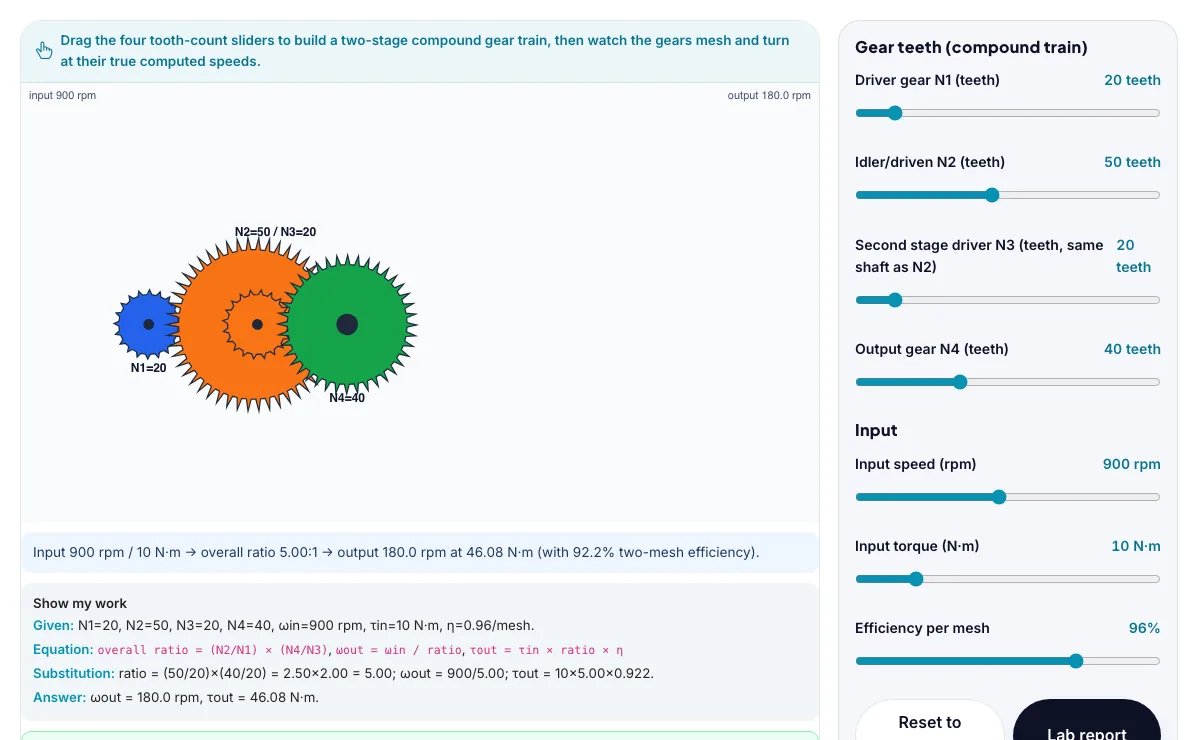
The Gear Train & Mechanical Advantage Designer with sample data entered and the result showing.
What is the Gear Train & Mechanical Advantage Designer?
Build a real two-stage compound gear train, watch the gears mesh and turn, and read off the true speed and torque the math predicts. It runs in your browser, so a change to a setting or a drag on an object shows up at once.
Compound gear trains like this appear in car transmissions, bicycle drivetrains, wind-up clocks, power drills and wind-turbine gearboxes, anywhere a motor's natural speed needs to be traded for more torque or vice versa.
3 steps to your result
Open the tool and follow along. Nothing to install.
What you get
Gear ratio is inversely proportional to tooth count: a small driver gear turning a large driven gear slows the speed down and multiplies the torque.
A compound gear train stacks two (or more) stages on shared shafts, so the overall ratio is the product of each stage's ratio.
Torque and speed trade off through a gear train: whatever factor speed is divided by, torque is multiplied by (minus friction losses).
Set N1=20, N2=50, N3=20, N4=40 and confirm the overall ratio is exactly 5:1.
Keep the input speed fixed and see how far you can drop the output speed by raising N2 and N4.
Try the 5:1 mechanical-advantage challenge.
Used for
Pick one to see how it fits.
Engineering learners
Engineering and technology students, makers, robotics clubs and teachers of design and technology.
Try it freeTeachers
For teachers: project the Gear Train & Mechanical Advantage Designer on the board, let students predict the result, then run it together and test this: Keep the input speed fixed and see how far you can drop the output speed by raising N2 and N4. For students: change one thing at a time and write down what changes.
Try it freeHow it compares
A plain look at this tool next to the usual alternative.
| This simulation | Textbook diagram | |
|---|---|---|
| Interactive | Drag, tap and change settings | Fixed picture |
| Install | Nothing to install | Not needed |
| Cost | Free to use | Depends on the book |
Questions people ask
Why does a compound gear train multiply the ratios of each stage instead of adding them?
Each stage independently divides speed (and multiplies torque) by its own ratio, and since the output of stage one becomes the input of stage two, the two scaling factors apply one after another - which is multiplication, not addition.
Why is the output torque slightly less than N times the input torque even though the gear ratio is exactly N?
Every real gear mesh has friction between the meshing teeth, so a small fraction of the input power is lost as heat at each mesh; the efficiency factors for each mesh multiply together and slightly reduce the torque the ideal ratio alone would predict.
Is the Gear Train & Mechanical Advantage Designer free to use?
Yes. The Gear Train & Mechanical Advantage Designer is free, needs no signup or download and runs in your web browser. It is part of the Engineering group of AZRS simulations.
Does the Gear Train & Mechanical Advantage Designer work on a phone or tablet?
Yes. The Gear Train & Mechanical Advantage Designer takes touch input as well as mouse input, so you can use its 6 adjustable settings with a finger. A larger screen makes the controls and graphs easier to read.
How do I use the Gear Train & Mechanical Advantage Designer?
1. In the Gear Train & Mechanical Advantage Designer, use the controls to change Driver gear N1 (teeth), Idler/driven N2 (teeth), Output gear N4 (teeth), Input speed (rpm), Input torque (N·m), and more. The simulation reacts instantly. 2. Start with this experiment: Set N1=20, N2=50, N3=20, N4=40 and confirm the overall ratio is exactly 5:1. Drag any glowing handle, object or slider with your mouse or finger and the Gear Train & Mechanical Advantage Designer responds in real time. 3. Change one setting at a time and watch which readout moves, then compare it with this idea: Gear ratio is inversely proportional to tooth count: a small driver gear turning a large driven gear slows the speed down and multiplies the torque.
More free tools
Related to the Gear Train & Mechanical Advantage Designer.
Try the Gear Train & Mechanical Advantage Designer now
Build a real two-stage compound gear train, watch the gears mesh and turn, and read off. Free to use.
Try it free