
The free Regex Tester with Live Match Highlighting
Free online regex tester. Type a regular expression and test string, see every match highlighted live, inspect capture groups, and try common flags (global.
- Free to use
- No signup
- Nothing to install
- Runs in your browser
Pattern: (\d{3})-(\d{4})
Flags: g
Text: "Call 555-1234 or 555-9876"
Matches: 555-1234 (group 1: 555, group 2: 1234), 555-9876 (group 1: 555, group 2: 9876)
Open the Regex Tester with Live Match Highlighting
Illustration. Open the tool for the real thing.
See it in action
Sample input: Pattern = (\d{3})-(\d{4}); Test text = Call 555-1234 or 555-9876 for support.
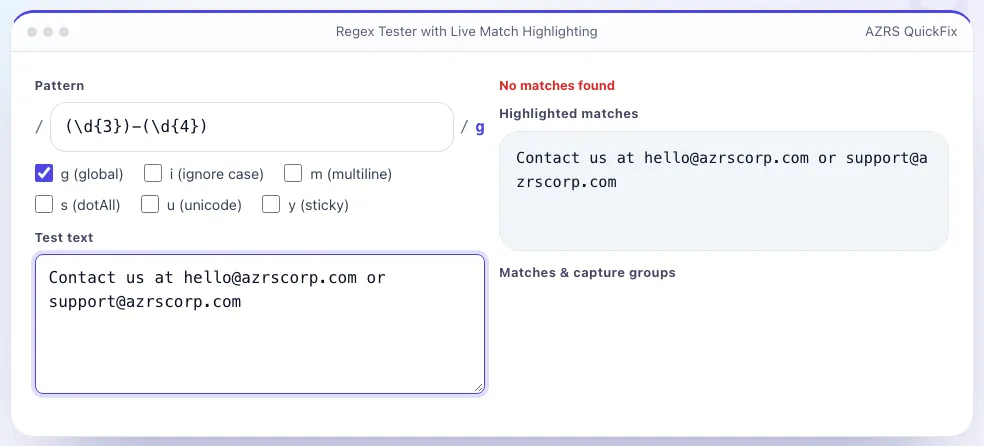
What is the Regex Tester with Live Match Highlighting?
Regular expressions are powerful but hard to get right by reading alone — a quantifier in the wrong place or an unescaped character can silently change what matches. This tester uses your browser's native JavaScript regex engine: type a pattern and a block of test text, and every match is highlighted directly in the text as you type, with no submit button and no server round-trip.
Below the highlighted text, each match is listed with its position and any capture groups it produced, which is the detail that is hardest to reason about by eye. Toggle the common flags — global (g), case-insensitive (i), multiline (m), dotAll (s) and unicode (u) — and see the match list update instantly, and a plain-English summary explains what your pattern element does part-by-part.
3 steps to your result
Open the tool and follow along. Nothing to install.
What you get
Matches are highlighted in the test text as you type the pattern.
See each numbered and named group's captured value per match.
g, i, m, s, u and y, toggled with one click each.
Uses your browser's native regex engine — instant and private.
AZRS tools are free to open and use.
It opens in your browser, so there is nothing to download.
Used for
Pick one to see how it fits.
Students learning regex
See immediately how each pattern element changes what matches.
Try it freeHow it compares
A plain look at this tool next to the usual alternative.
| This utility | Desktop software | |
|---|---|---|
| Install | Nothing to install | Usually an app or program to install |
| Account | No signup | Depends on the product |
| Cost | Free to use | Free or paid, depends on the product |
| Where it runs | In your browser tab | On your computer |
Questions people ask
Which regex flavour does this use?
Your browser's native JavaScript regex engine (ECMAScript), which is very close to what Node.js and most browsers use in production code.
Why isn't my pattern matching anything?
Check that special characters are escaped, that you have the right flags (especially case-insensitive for mixed-case text), and that anchors like ^ or $ aren't restricting the match unintentionally.
Can I see named capture groups?
Yes, groups defined with (?<name>...) are listed by name alongside numbered groups.
Does it support lookahead and lookbehind?
Yes, both are supported since they are standard JavaScript regex features.
Is my test text sent anywhere?
No, matching happens entirely in your browser; nothing is uploaded.
More free tools
Related to the Regex Tester with Live Match Highlighting.
Try the Regex Tester with Live Match Highlighting now
Test regular expressions with live highlighted matches and capture groups. Free to use.
Try it free