
Try the Markdown Live Editor & Previewer
Free online Markdown editor with a live side-by-side preview. Write headings, lists, tables, links, code blocks and images, see the rendered HTML instantly.
- Free to use
- No signup
- Nothing to install
- Runs in your browser
Illustration. Open the tool for the real thing.
See it in action
Sample input: Markdown = ## Hello Markdown Write **bold**, ...
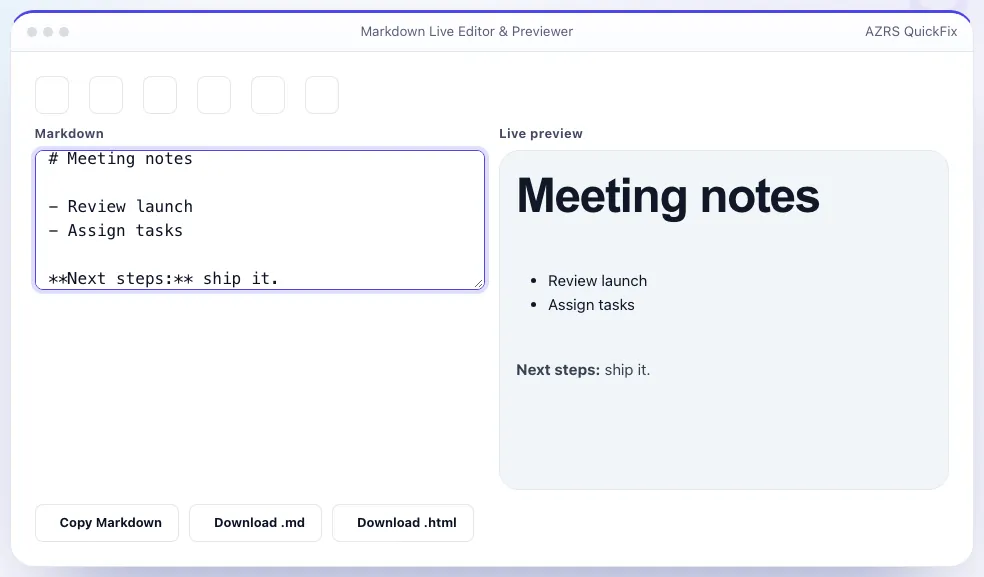
What is the Markdown Live Editor & Previewer?
Markdown is the plain-text format behind READMEs, GitHub issues, blog posts and note-taking apps, but it is easy to get syntax like tables or nested lists slightly wrong without seeing the result. This editor splits the screen: write Markdown on the left in a monospace box with common formatting shortcuts, and see the fully rendered HTML update on the right as you type, with no delay and no server call.
It supports the full common Markdown syntax — headings, bold and italic, links, images, blockquotes, ordered and unordered lists, fenced code blocks with syntax highlighting, inline code and tables — plus a toolbar for inserting formatting without memorising the symbols. Export your work as raw Markdown text or as a standalone HTML file.
3 steps to your result
Open the tool and follow along. Nothing to install.
What you get
Rendered HTML updates as you type, with no delay.
Insert bold, links, lists, tables and code blocks with one click.
Full support including fenced code blocks and inline code.
Copy or download either format when you're done.
AZRS tools are free to open and use.
It opens in your browser, so there is nothing to download.
Used for
Pick one to see how it fits.
Bloggers and technical writers
Write in Markdown for a static site generator and see the result before publishing.
Try it freeStudents and note-takers
Format notes with headings, lists and tables without a heavyweight app.
Try it freeHow it compares
A plain look at this tool next to the usual alternative.
| This utility | Desktop software | |
|---|---|---|
| Install | Nothing to install | Usually an app or program to install |
| Account | No signup | Depends on the product |
| Cost | Free to use | Free or paid, depends on the product |
| Where it runs | In your browser tab | On your computer |
Questions people ask
Is this GitHub-flavoured Markdown?
Yes, it supports the common GitHub-flavoured extensions including tables, fenced code blocks and strikethrough.
Can I export as HTML?
Yes, use the export button to download the rendered output as a standalone HTML file.
Is my text saved if I close the tab?
No, this tool does not store your content; copy or export before closing if you want to keep it.
Does it support images?
Yes, using standard Markdown image syntax with a URL; local file embedding is not supported since nothing is uploaded.
Can I write tables easily?
Yes, use the table toolbar button to insert a starter table, then edit the pipe-separated cells.
More free tools
Related to the Markdown Live Editor & Previewer.
Try the Markdown Live Editor & Previewer now
Write Markdown on the left, see the rendered preview update live on the right. Free to use.
Try it free