
The free File Encryption Tool
This tool covers four related jobs in one interface, switched with a mode tab: encrypt a file with a password, decrypt a previously encrypted file, generate a cryptographic hash of a file
- Free to use
- No signup
- Nothing to install
- Works in any modern browser
Illustration. Open the tool for the real thing.
See it in action
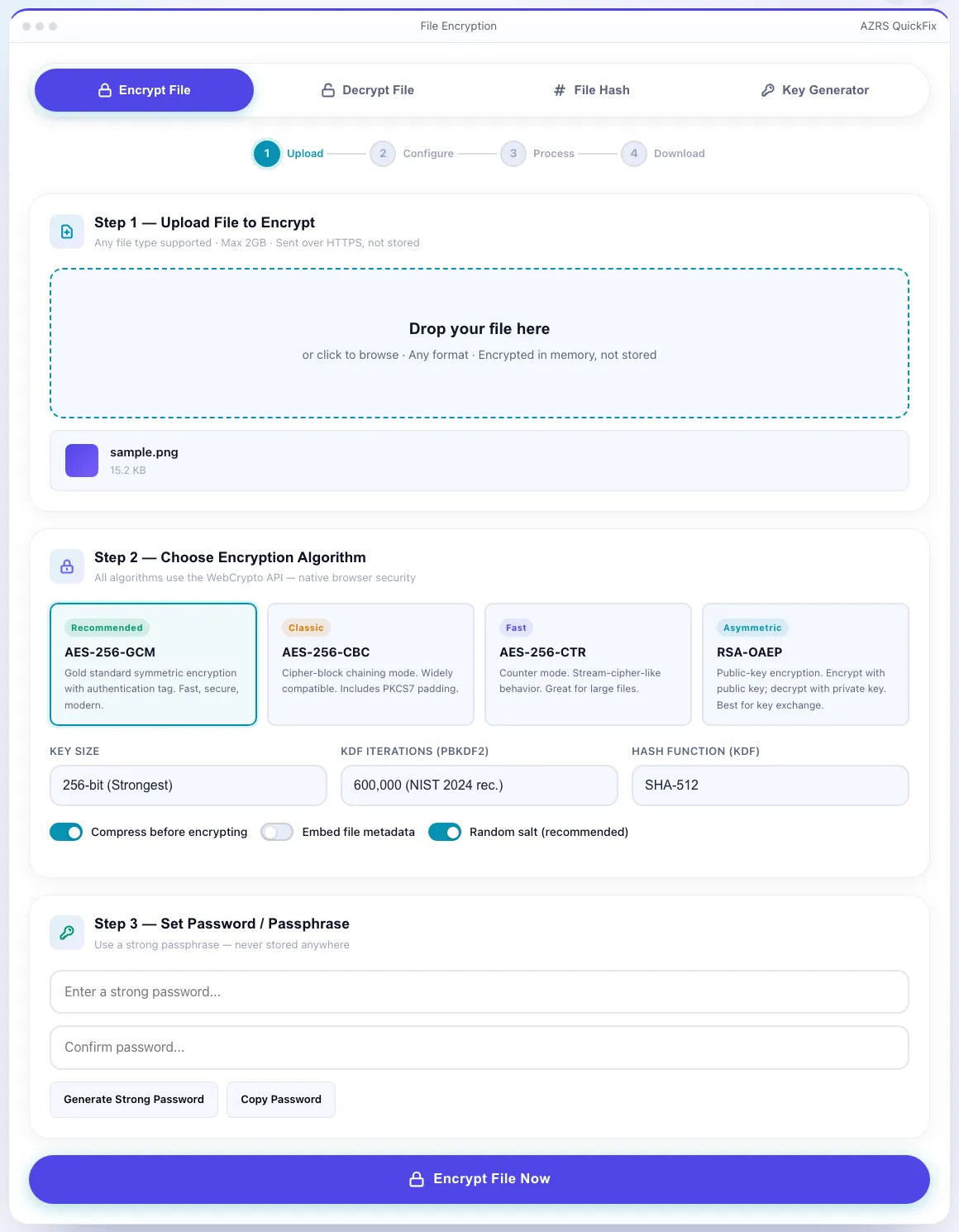
The File Encryption Tool with sample data entered and the result showing.
What is the File Encryption Tool?
This tool covers four related jobs in one interface, switched with a mode tab: encrypt a file with a password, decrypt a previously encrypted file, generate a cryptographic hash of a file for integrity checks, and generate encryption keys. Encryption uses AES with a configurable key size, iteration count and hash algorithm for the password-based key derivation.
A four-step progress indicator (select mode → upload → configure → process) keeps the workflow clear, and options like optional compression before encrypting and stripping file metadata let you tune the output for either smaller size or extra privacy.
3 steps to your result
Open the tool and follow along. Nothing to install.
What you get
Protect a file with a password using AES, with adjustable key size, iteration count and hash algorithm.
Generate a cryptographic hash of a file to verify it hasn't been altered or corrupted.
Generate encryption keys for use with the encrypt/decrypt workflow.
Optionally compress the file before encrypting, and optionally remove embedded metadata.
AZRS tools are free to open and use.
It opens in your browser, so there is nothing to download.
Used for
Pick one to see how it fits.
Freelancers & small teams
Encrypt a contract or financial file before emailing it, since email itself isn't encrypted.
Try it freeStudents & researchers
Protect sensitive survey data or personal files stored on a shared or public computer.
Try it freeDevelopers
Generate a quick file hash to confirm a downloaded or transferred file wasn't corrupted.
Try it freeHow it compares
A plain look at this tool next to the usual alternative.
| This file tool | Desktop software | |
|---|---|---|
| Install | Nothing to install | Usually an app or program to install |
| Account | No signup | Depends on the product |
| Cost | Free to use | Free or paid, depends on the product |
Questions people ask
Is this file encryption tool free?
Yes, all four modes (encrypt, decrypt, hash, key generator) are free with no signup.
What encryption standard does it use?
AES, with a configurable key size, iteration count and hash algorithm for password-based key derivation.
What happens if I forget my password?
The file cannot be recovered — there's no backdoor, so store your password somewhere safe before closing the tab.
Is the file uploaded to a server?
Processing happens through the tool's own workflow and files are not kept after processing.
What's file hashing used for?
A hash lets you verify a file wasn't altered or corrupted, by comparing the hash before and after a transfer.
More free tools
Related to the File Encryption Tool.
Try the File Encryption Tool now
This tool covers four related jobs in one interface, switched with a mode tab: encrypt a. Free to use.
Try it free