
The free Excel/Sheets Formula Explainer
Paste any Excel or Google Sheets formula and get a deterministic, step-by-step explanation of its structure — every function.
- Free to use
- No signup
- Nothing to install
- Runs in your browser
=IF(SUM(B2:B10)>1000,"Over budget","OK") is parsed as: an IF function with three arguments — a condition SUM(B2:B10)>1000 (itself a SUM over the range B2:B10 compared to 1000), a value if true ("Over budget"), and a value if false ("OK") — explained step by step in that exact structure.
Open the Excel/Sheets Formula Explainer
Illustration. Open the tool for the real thing.
See it in action
Sample input: e.g. =IF(SUM(B2:B10)>1000,"Over budget","OK") = =IF(SUM(B2:B10)>1000,"Over budget",.... Pressed Explain formula.
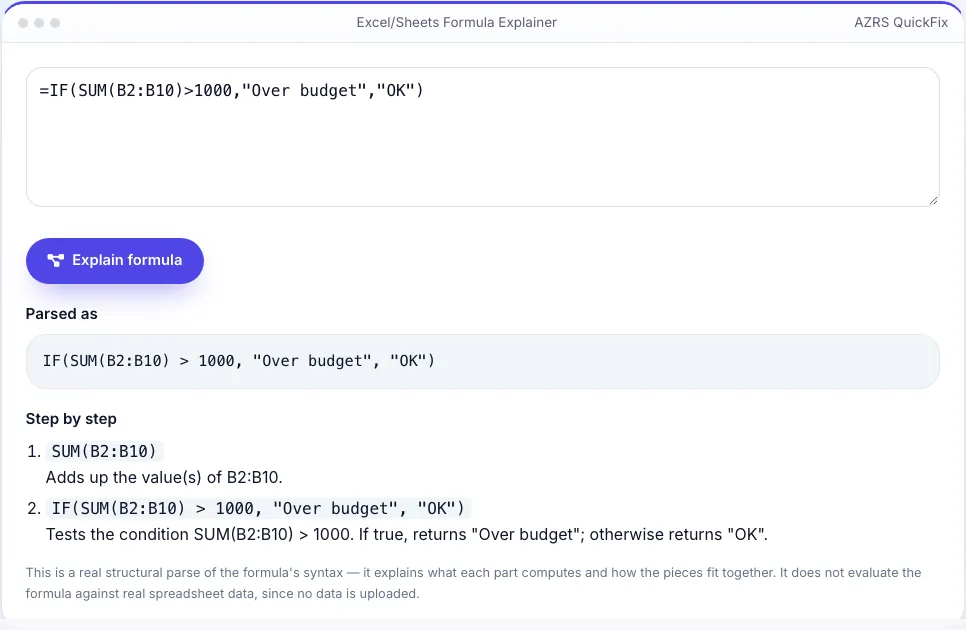
What is the Excel/Sheets Formula Explainer?
Inherited spreadsheets are full of formulas nobody remembers writing — nested IFs, VLOOKUPs, INDEX/MATCH combos, SUMIFS with five conditions. This tool runs a real recursive-descent parser over the formula text you paste — the same kind of deterministic parsing a spreadsheet engine itself would do — breaking it into its actual function calls, arguments, operators and cell/range references, rather than pattern-matching keywords or guessing from the text.
For each recognized function (SUM, AVERAGE, IF, IFS, VLOOKUP, HLOOKUP, INDEX, MATCH, SUMIF, SUMIFS, COUNTIF, COUNTIFS, CONCATENATE, IFERROR, ROUND, AND, OR, and more), it explains in plain English exactly what that function does and how the specific arguments you supplied plug into it — a real structural explanation of the formula's mechanics, not a data evaluation and not an AI guess at what the sheet 'probably' does.
3 steps to your result
Open the tool and follow along. Nothing to install.
What you get
Actually parses the formula's syntax tree — nested functions, operators and references — instead of scanning for keywords.
Each recognized function explains its real mechanics using your exact arguments.
Correctly explains formulas with functions nested inside other functions' arguments, several levels deep.
If a function isn't in its dictionary, it says so plainly instead of pretending to explain it.
AZRS tools are free to open and use.
It opens in your browser, so there is nothing to download.
Used for
Pick one to see how it fits.
Anyone inheriting someone else's spreadsheet
Understand exactly what a complex formula does before trusting or editing it.
Try it freeStudents learning spreadsheet functions
See a real structural breakdown of how VLOOKUP, INDEX/MATCH or SUMIFS actually fit together.
Try it freeAnalysts auditing a financial model
Quickly confirm what a formula is really doing without manually tracing every nested function by eye.
Try it freeHow it compares
A plain look at this tool next to the usual alternative.
| This utility | Desktop software | |
|---|---|---|
| Install | Nothing to install | Usually an app or program to install |
| Account | No signup | Depends on the product |
| Cost | Free to use | Free or paid, depends on the product |
| Where it runs | In your browser tab | On your computer |
Questions people ask
Does this actually calculate the formula's result?
No — it explains what the formula's structure computes and how its pieces fit together, deterministically, from the formula text alone. It does not evaluate against real spreadsheet data, since no data is uploaded.
Which functions does it recognize?
Common Excel/Sheets functions including SUM, AVERAGE, IF, IFS, VLOOKUP, HLOOKUP, INDEX, MATCH, SUMIF, SUMIFS, COUNTIF, COUNTIFS, CONCATENATE, IFERROR, ROUND, AND, OR, MIN, MAX and more — an unrecognized function is clearly flagged rather than guessed at.
Does it work for Google Sheets formulas too?
Yes — the large majority of functions and syntax are identical between Excel and Google Sheets, so most formulas parse and explain the same way in either.
What if my formula has a syntax error?
The parser reports where parsing failed (like an unmatched parenthesis or a missing argument) instead of guessing at a broken structure.
Can it explain array formulas or LAMBDA?
Basic array-style ranges are supported; the newest dynamic-array and LAMBDA functions are less consistently recognized and may show as unrecognized — this is called out honestly rather than faked.
More free tools
Related to the Excel/Sheets Formula Explainer.
Try the Excel/Sheets Formula Explainer now
Paste an Excel or Google Sheets formula and get a real, step-by-step structural breakdown. Free to use.
Try it free