
Explore the Carbon Cycle Simulator: Reservoirs & Fluxes
Set emissions, deforestation and uptake rates and watch carbon flow between the atmosphere, ocean, land biosphere. Free, no signup, runs in your browser.
- Free to use
- No signup
- Nothing to install
- Runs in your browser
Illustration. Open the tool for the real thing.
See it in action
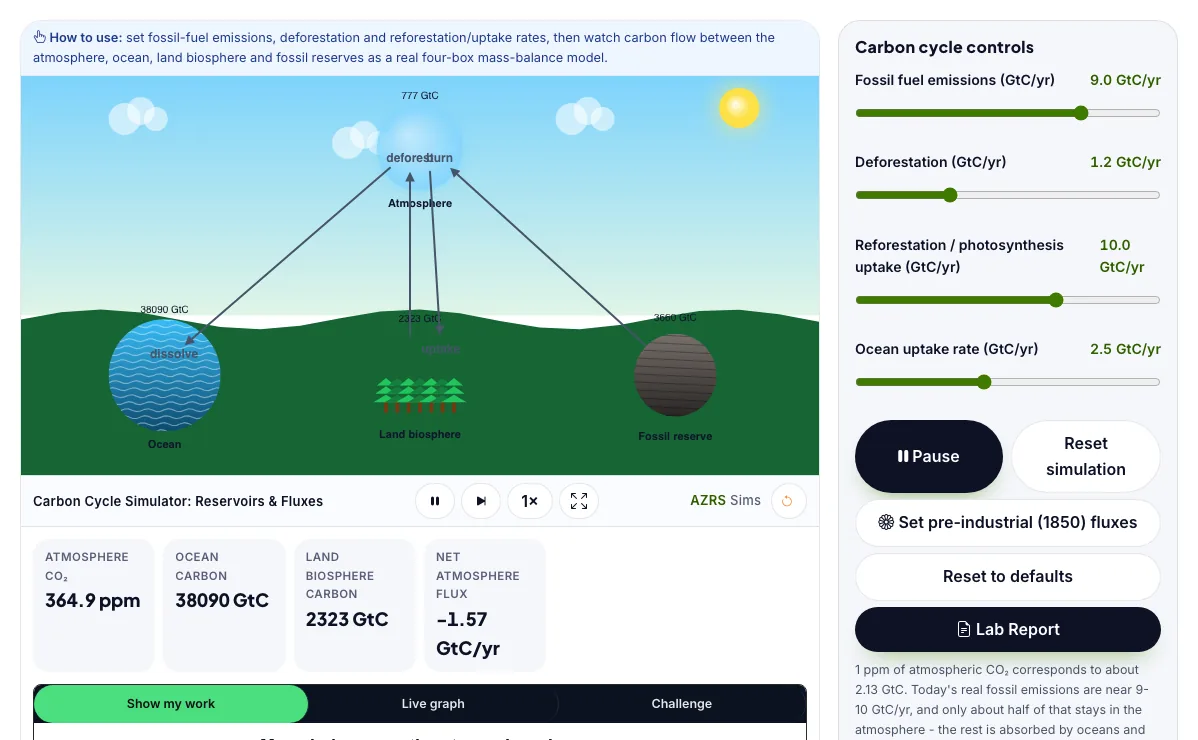
The Carbon Cycle Simulator: Reservoirs & Fluxes with sample data entered and the result showing.
What is the Carbon Cycle Simulator: Reservoirs & Fluxes?
Set emissions, deforestation and uptake rates and watch carbon flow between the atmosphere, ocean, land biosphere and fossil reserves in a real mass-balance model. It runs in your browser, so a change to a setting or a drag on an object shows up at once.
Climate scientists build exactly this kind of multi-reservoir carbon-budget model - IPCC reports summarize sources and sinks in gigatonnes of carbon per year to track how close the world is to net-zero targets.
3 steps to your result
Open the tool and follow along. Nothing to install.
What you get
The carbon cycle moves carbon between four main reservoirs: the atmosphere, the ocean, the land biosphere (plants and soil) and long-buried fossil fuel deposits.
Atmospheric CO₂ rises whenever the fluxes into it (burning fossil fuels, deforestation) exceed the fluxes out of it (photosynthesis uptake, ocean absorption).
1 part per million of atmospheric CO₂ corresponds to about 2.13 gigatonnes of carbon (GtC), which is how scientists convert between the ppm reported in the news and the GtC used in carbon budgets.
Set fossil emissions and deforestation to zero and watch CO₂ slowly fall as sinks keep absorbing.
Try to hit net-zero with realistic non-zero fossil emissions by raising reforestation and ocean uptake.
Run the simulation for 50 years at today's real-world emission rates and watch the ppm readout climb.
Used for
Pick one to see how it fits.
Environmental Science learners
Students, teachers and curious learners of all ages.
Try it freeTeachers
For teachers: project the Carbon Cycle Simulator: Reservoirs & Fluxes on the board, let students predict the result, then run it together and test this: Try to hit net-zero with realistic non-zero fossil emissions by raising reforestation and ocean uptake. For students: change one thing at a time and write down what changes.
Try it freeHow it compares
A plain look at this tool next to the usual alternative.
| This simulation | Textbook diagram | |
|---|---|---|
| Interactive | Drag, tap and change settings | Fixed picture |
| Install | Nothing to install | Not needed |
| Cost | Free to use | Depends on the book |
Questions people ask
Why does today's atmosphere keep rising even though land and ocean absorb roughly half of emissions?
Only about half of current fossil-fuel and deforestation emissions are being reabsorbed by land and ocean sinks; the remaining net surplus each year adds to the atmosphere reservoir, so its GtC (and ppm) total keeps climbing.
What does it actually take to reach 'net zero'?
Net zero means the total carbon flowing out of the atmosphere (via reforestation, restored ecosystems, ocean uptake, and any active removal) equals the total still flowing in from remaining fossil emissions and deforestation, so the atmosphere reservoir stops growing even if raw emissions are not literally zero.
Is the Carbon Cycle Simulator: Reservoirs & Fluxes free to use?
Yes. The Carbon Cycle Simulator: Reservoirs & Fluxes is free, needs no signup or download and runs in your web browser. It is part of the Environmental Science group of AZRS simulations.
Does the Carbon Cycle Simulator: Reservoirs & Fluxes work on a phone or tablet?
Yes. The Carbon Cycle Simulator: Reservoirs & Fluxes takes touch input as well as mouse input, so you can use its 4 adjustable settings with a finger. A larger screen makes the controls and graphs easier to read.
How do I use the Carbon Cycle Simulator: Reservoirs & Fluxes?
1. In the Carbon Cycle Simulator: Reservoirs & Fluxes, use the controls to change Fossil fuel emissions (GtC/yr), Deforestation (GtC/yr), Reforestation / photosynthesis uptake (GtC/yr), Ocean uptake rate (GtC/yr). The simulation reacts instantly. 2. In the Carbon Cycle Simulator: Reservoirs & Fluxes, press "▶ Run 1 year/s", "Reset simulation", "Set pre-industrial (1850) fluxes" to start, reset or change what is happening. 3. Start with this experiment: Set fossil emissions and deforestation to zero and watch CO₂ slowly fall as sinks keep absorbing. Drag any glowing handle, object or slider with your mouse or finger and the Carbon Cycle Simulator: Reservoirs & Fluxes responds in real time. 4. Change one setting at a time and watch which readout moves, then compare it with this idea: The carbon cycle moves carbon between four main reservoirs: the atmosphere, the ocean, the land biosphere (plants and soil) and long-buried fossil fuel deposits.
More free tools
Related to the Carbon Cycle Simulator: Reservoirs & Fluxes.
Try the Carbon Cycle Simulator: Reservoirs & Fluxes now
Set emissions, deforestation and uptake rates and watch carbon flow between the. Free to use.
Try it free