
Your 3D Printer Calibration G-code Generator
Generate ready-to-print calibration G-code for your exact printer: temperature tower, retraction test, flow / extrusion multiplier, max volumetric flow.
- Free to use
- No signup
- Nothing to install
- Runs in your browser
A PLA temperature tower from 215 °C down to 185 °C in 5 °C steps gives 7 blocks of 10 mm each. The table lists the height range of every block (block 4 = 200 °C at 30–40 mm), so if the cleanest-looking section is 30–40 mm tall you know to print this filament at 200 °C.Open the 3D Printer Calibration G-code Generator
Illustration. Open the tool for the real thing.
See it in action
Sample input: Start temp (°C) = 230; End temp (°C) = 190; Step (°C) = 5; Block height (mm) = 10. Pressed Generate G-code.
What is the 3D Printer Calibration G-code Generator?
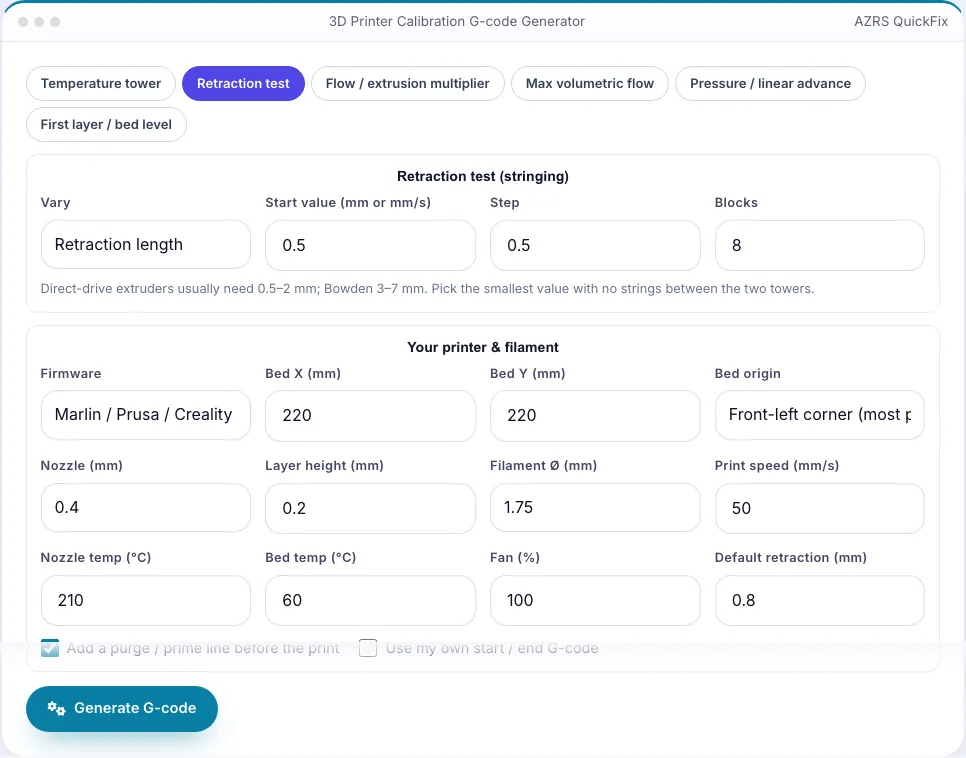
Calibration prints are small, but getting them is a chore: download an STL, slice it, edit the temperature at each layer, mess with start G-code. This generator writes the G-code directly. Set your bed size and origin, nozzle, layer height, filament diameter, speeds and temperatures once, choose a test and press Generate — you get a complete file with a purge line, layer-change comments and the exact commands for your firmware (Marlin M900 K, Klipper SET_PRESSURE_ADVANCE, RepRap M572).
Six tests are included. The temperature tower steps the nozzle temperature every block; the retraction test prints two towers while the retraction length or speed changes per block; the flow test prints single-wall bands at different flow percentages and converts your caliper measurement into the right setting; the max-flow test raises speed (and so volumetric flow) every band to find your hotend's limit; the pressure-advance pattern prints slow-fast-slow lines at increasing K; and the first-layer test prints solid squares across the bed to verify levelling. A 3D preview and a table tell you what each band or line means.
3 steps to your result
Open the tool and follow along. Nothing to install.
What you get
Temperature, retraction, flow, max volumetric flow, pressure advance and first layer.
Marlin, Klipper and RepRapFirmware commands; or paste your own start/end G-code.
Layer markers and feature-type comments so any viewer understands it.
Block-by-block table and instructions for how to read the result.
AZRS tools are free to open and use.
It opens in your browser, so there is nothing to download.
Used for
Pick one to see how it fits.
Anyone tuning a new printer or filament
Dial in temperature, retraction, flow and K without a slicer.
Try it freeHow it compares
A plain look at this tool next to the usual alternative.
| This 3d tool | Desktop software | |
|---|---|---|
| Install | Nothing to install | Usually an app or program to install |
| Account | No signup | Depends on the product |
| Cost | Free to use | Free or paid, depends on the product |
| Where it runs | In your browser tab | On your computer |
Questions people ask
Is the generated G-code safe?
It is plain G-code with homing, heating and moves inside your bed size. Always watch the first layers on a new printer.
Why a hollow tower instead of the usual STL?
Walls-only towers keep file size and print time small; they test the same variables.
Does it work with Klipper macros?
Paste START_PRINT/END_PRINT in the custom start/end boxes.
Is anything uploaded?
No.
How do I use the 3D Printer Calibration G-code Generator?
1. Pick a test tab and set its parameters. 2. Enter your printer and filament settings. 3. Press Generate G-code and check the preview. 4. Download the .gcode, print it and read the result with the table.
More free tools
Related to the 3D Printer Calibration G-code Generator.
Try the 3D Printer Calibration G-code Generator now
Generate temperature tower, retraction, flow, max-flow, pressure advance & bed-level. Free to use.
Try it free