
Try the Favicon Generator
Free favicon generator. Upload a logo and get a proper favicon.ico plus every PNG size a modern site needs (16, 32, 48, 180, 192, 512).
- Free to use
- No signup
- Nothing to install
- Runs in your browser
Illustration. Open the tool for the real thing.
See it in action
Sample input: File = sample.png
What is the Favicon Generator?
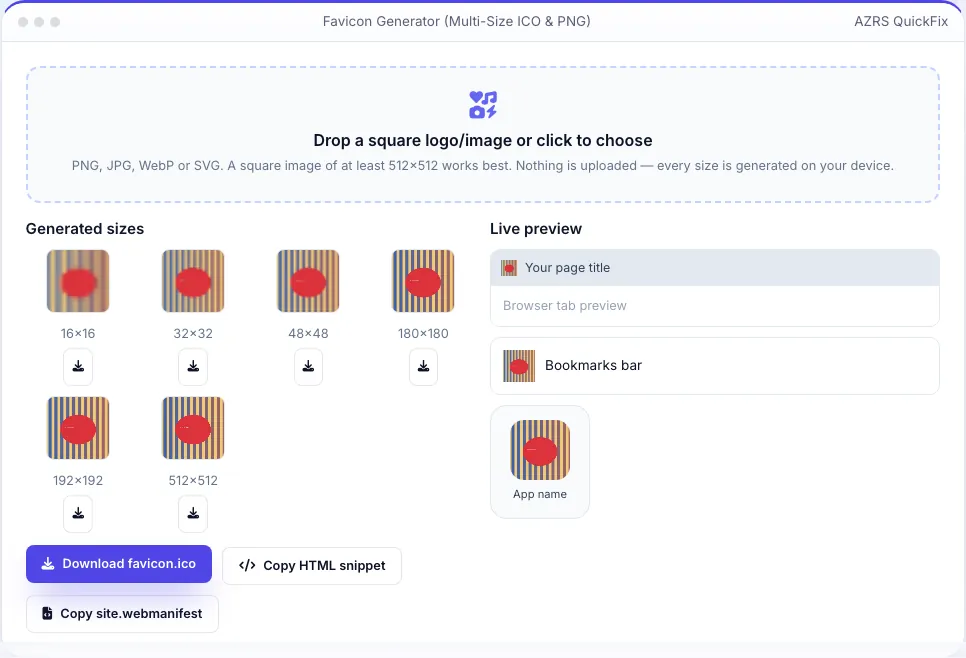
A modern website needs more than a single favicon.ico: browsers, bookmarks, iOS home screens and Android app shortcuts each expect their own size and format. Upload one square logo or image and this tool automatically crops it to a square, then renders it at every size a real site needs — 16×16 and 32×32 for the classic favicon, 48×48 for Windows site icons, 180×180 for Apple's home-screen touch icon, and 192×192 and 512×512 for Android and web-app manifests — all rendered locally on your device using the canvas API, with nothing ever uploaded to a server.
Download any individual PNG size, or click one button to build and download a genuine multi-resolution favicon.ico containing the 16, 32 and 48 px images embedded as PNG frames inside a proper ICO container — the same format browsers expect, built here with a small hand-written ICO encoder rather than a fixed template. A live preview shows your new icon the way it will actually appear in a browser tab, a bookmarks bar and a phone home screen, and one click each copies the exact <code><link rel="icon"></code> HTML block and a starter <code>site.webmanifest</code> file ready to paste into your project.
3 steps to your result
Open the tool and follow along. Nothing to install.
What you get
16, 32, 48, 180, 192 and 512 px, auto square-cropped.
A genuine multi-size ICO built in your browser, not a renamed PNG.
See exactly how it will look before you deploy.
Copies both the HTML link tags and a starter site.webmanifest.
AZRS tools are free to open and use.
It opens in your browser, so there is nothing to download.
Used for
Pick one to see how it fits.
Web developers and freelancers
Ship a complete, correct favicon set in under a minute.
Try it freeSmall business owners
Turn a logo file into browser-ready icons without design software.
Try it freeAnyone launching a site or web app
Cover desktop, iOS and Android icon requirements in one pass.
Try it freeHow it compares
A plain look at this tool next to the usual alternative.
| This utility | Desktop software | |
|---|---|---|
| Install | Nothing to install | Usually an app or program to install |
| Account | No signup | Depends on the product |
| Cost | Free to use | Free or paid, depends on the product |
| Where it runs | In your browser tab | On your computer |
Questions people ask
Is this a real .ico file or just a renamed PNG?
It is a genuine ICO container built in your browser, with the 16, 32 and 48 px images embedded as PNG frames inside proper ICO directory entries — the same structure real favicon.ico files use.
Do I need all six sizes?
For a modern site, at minimum use the ICO, the 32×32 PNG, the 180×180 Apple touch icon and the manifest icons; the rest are extra polish for specific platforms.
Is my logo uploaded anywhere?
No. Cropping and resizing happen entirely in your browser using the canvas API; the image never leaves your device.
Why is my icon blurry at 16×16?
Small favicons have very little room for detail — simplify your logo (fewer colours, thicker shapes) for the clearest result at that size.
What is site.webmanifest for?
It tells mobile browsers and "Add to Home Screen" features your app's name, icons and colours; you can also skip it if you do not need a web-app manifest.
More free tools
Related to the Favicon Generator.
Try the Favicon Generator now
Turn any logo into a complete favicon set — ICO, PNGs, manifest and HTML tags. Free to use.
Try it free