
Try the Chmod Permissions Calculator
Calculate Linux and Unix file permissions visually. Tick read/write/execute for owner, group and others to get the octal number (755, 644).
- Free to use
- No signup
- Nothing to install
- Runs in your browser
Illustration. Open the tool for the real thing.
See it in action
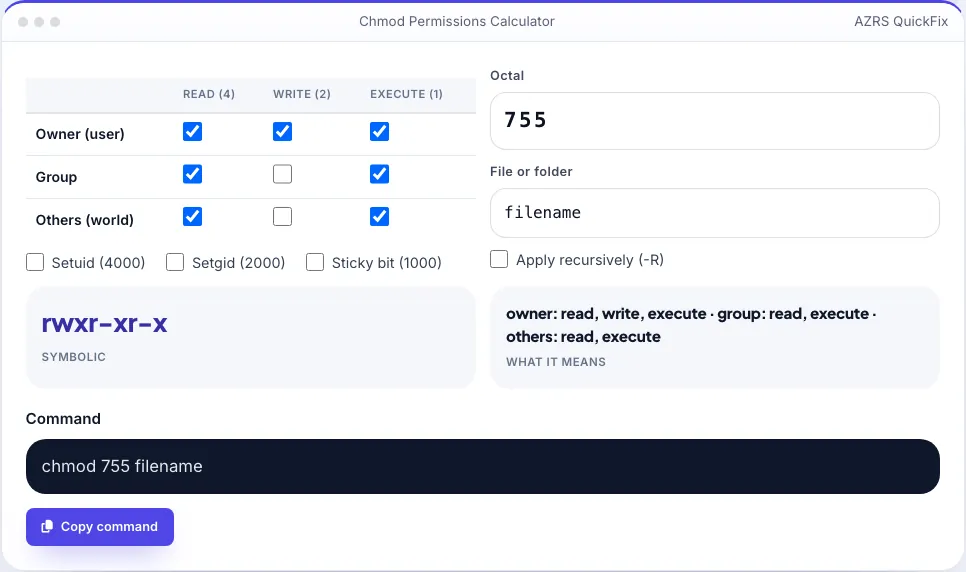
Sample input: Octal = 755; File or folder = filename
What is the Chmod Permissions Calculator?
On Linux, macOS and other Unix systems every file has permissions for three classes of user — the owner, the group and everyone else — and each class can be allowed to read (r), write (w) and execute (x). The chmod command changes them, usually with a three-digit octal number such as 755 or 644.
This calculator lets you tick the boxes and instantly see the octal value, the symbolic form (like rwxr-xr-x) and the exact chmod command. You can also type an octal value to see which boxes it represents. It is a quick way to get web server, SSH key and script permissions right and avoid security mistakes.
3 steps to your result
Open the tool and follow along. Nothing to install.
What you get
Read, write and execute for owner, group and others.
755 and rwxr-xr-x shown together.
Copy the chmod command for your file.
Setuid, setgid and sticky bit supported.
AZRS tools are free to open and use.
It opens in your browser, so there is nothing to download.
Used for
Pick one to see how it fits.
How it compares
A plain look at this tool next to the usual alternative.
| This utility | Desktop software | |
|---|---|---|
| Install | Nothing to install | Usually an app or program to install |
| Account | No signup | Depends on the product |
| Cost | Free to use | Free or paid, depends on the product |
| Where it runs | In your browser tab | On your computer |
Questions people ask
What does chmod 755 mean?
Owner can read, write and execute; group and others can read and execute.
What does chmod 644 mean?
Owner can read and write; group and others can only read.
How are the octal numbers calculated?
Read = 4, write = 2, execute = 1; add them for each class.
What is the sticky bit?
On a directory, it lets only the file’s owner delete it — used on /tmp.
Why is 777 dangerous?
Anyone on the system can change or replace the file.
More free tools
Related to the Chmod Permissions Calculator.
Try the Chmod Permissions Calculator now
Linux file permissions: octal, symbolic & commands. Free to use.
Try it free